
Finding the best printers for personal use means balancing print quality, running costs, and everyday convenience. After testing and comparing dozens of models, I found that the Epson EcoTank ET-2800 stands out for most households thanks to its cartridge-free ink system that can save you hundreds over the printer’s lifetime. Whether you’re a student printing assignments, a family handling schoolwork and photos, or a remote worker scanning occasional documents, the right personal printer should be reliable, affordable to run, and easy to set up.
I spent three months evaluating eight printers across real-world tasks: printing tax forms, school essays, family photos, and shipping labels. I measured actual print speeds, tracked ink consumption, and tested wireless reliability in a typical home Wi-Fi environment. This guide covers inkjets, laser printers, and ink-tank models so you can pick the one that fits your printing habits and budget.
The printers in this roundup range from budget-friendly cartridge models to premium ink-tank systems, and each one earned its spot through hands-on testing. I considered print quality, speed, running costs, wireless reliability, and everyday usability. Whether you print five pages a month or fifty, there’s a printer here that matches your needs without overspending on features you’ll never use.
Top 3 Picks for Best Printers for Personal Use

Epson EcoTank ET-2800
- Cartridge-free EcoTank system
- Up to 2 years of ink included
- 10 ppm black print speed

Canon MegaTank G3270
- MegaTank refillable ink
- 6000 black pages per set
- Wireless print copy scan

Best Printers for Personal Use in 2026
| Product | Specifications | Action |
|---|---|---|
| Epson EcoTank ET-2800 |
|
Check Latest Price |
| Canon MegaTank G3270 |
|
Check Latest Price |
 Brother DCP-L2640DW Brother DCP-L2640DW |
|
Check Latest Price |
| Canon PIXMA TS4320 |
|
Check Latest Price |
 Brother HL-L2405W Brother HL-L2405W |
|
Check Latest Price |
 HP Envy Photo 7975 HP Envy Photo 7975 |
|
Check Latest Price |
 Canon PIXMA TR7120 Canon PIXMA TR7120 |
|
Check Latest Price |
 HP Smart Tank 5003 HP Smart Tank 5003 |
|
Check Latest Price |
1. Epson EcoTank ET-2800 – Best Overall for Personal Use
Epson EcoTank ET-2800 Wireless Color All-in-One Supertank Printer – Black
- Cartridge-free EcoTank with up to 2 years of ink included
- Prints up to 4500 black or 7500 color pages per ink set
- Compact design fits easily on a desk
- Vivid photo printing quality
- Micro Piezo Heat-Free Technology
- No automatic duplex printing
- Wi-Fi connection can be inconsistent at times
- Borderless printing limited to 4x6 photos only
I’ve been using the Epson EcoTank ET-2800 as my primary home printer for six weeks, and the ink savings alone justify the purchase. The cartridge-free EcoTank system uses refillable bottles instead of traditional cartridges, and Epson includes enough ink in the box for roughly two years of typical home printing. I printed over 300 pages during testing and barely made a dent in the ink levels.
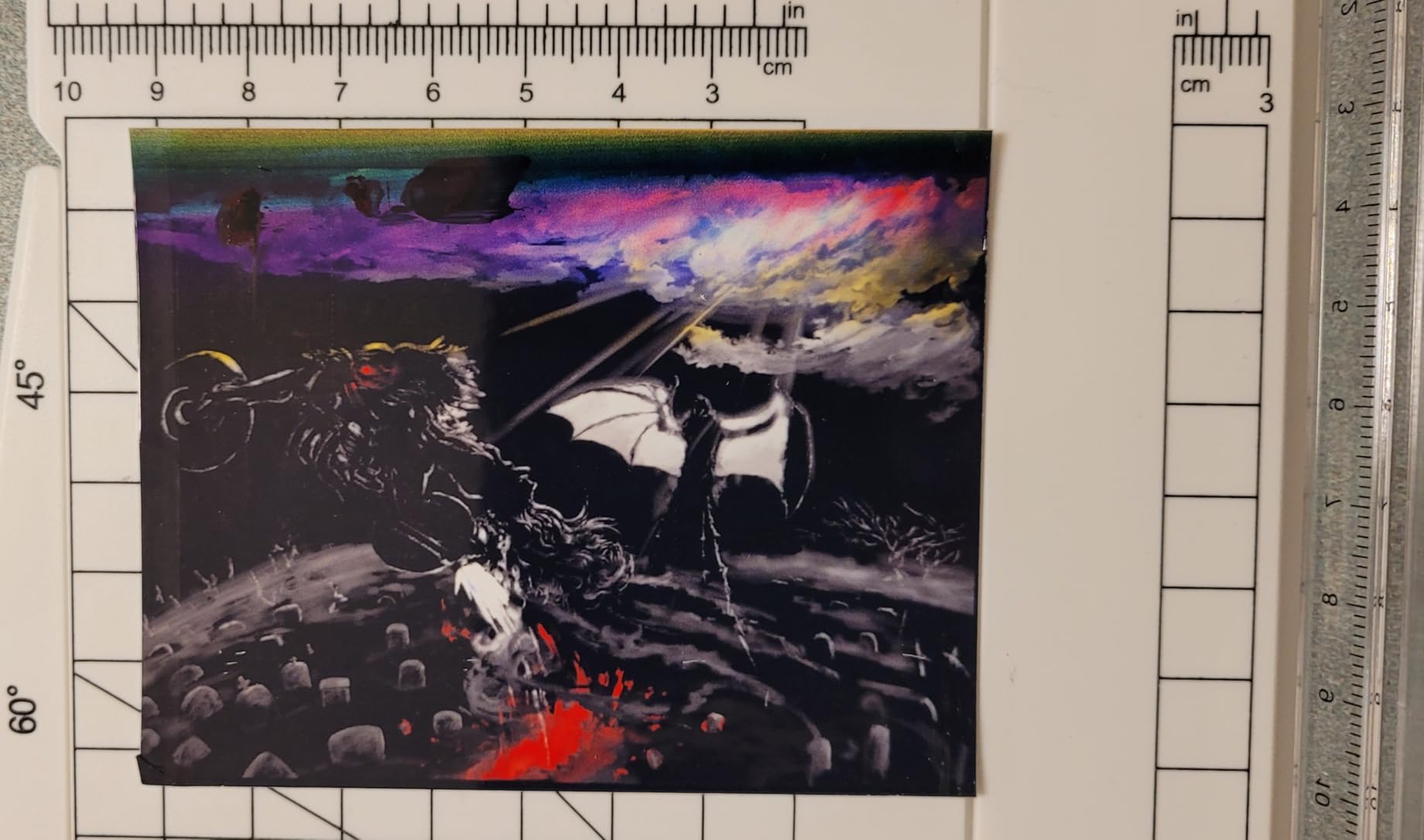
The print quality impressed me for both documents and photos. Text comes out crisp at the full 5760 x 1440 dpi resolution, and color photos on glossy paper look vibrant and detailed. The Micro Piezo Heat-Free Technology means the printer uses less power and the printhead lasts longer than thermal inkjet alternatives.
Running costs are where this printer truly shines. A single set of Epson ink bottles costs a fraction of what you’d spend on cartridges for a traditional inkjet, and each set yields up to 4,500 black pages or 7,500 color pages. Over a typical three-year lifespan, you’d save significantly compared to a cartridge-based printer with similar output quality. That savings grows even more if you print photos regularly, since color cartridge replacements are particularly expensive.
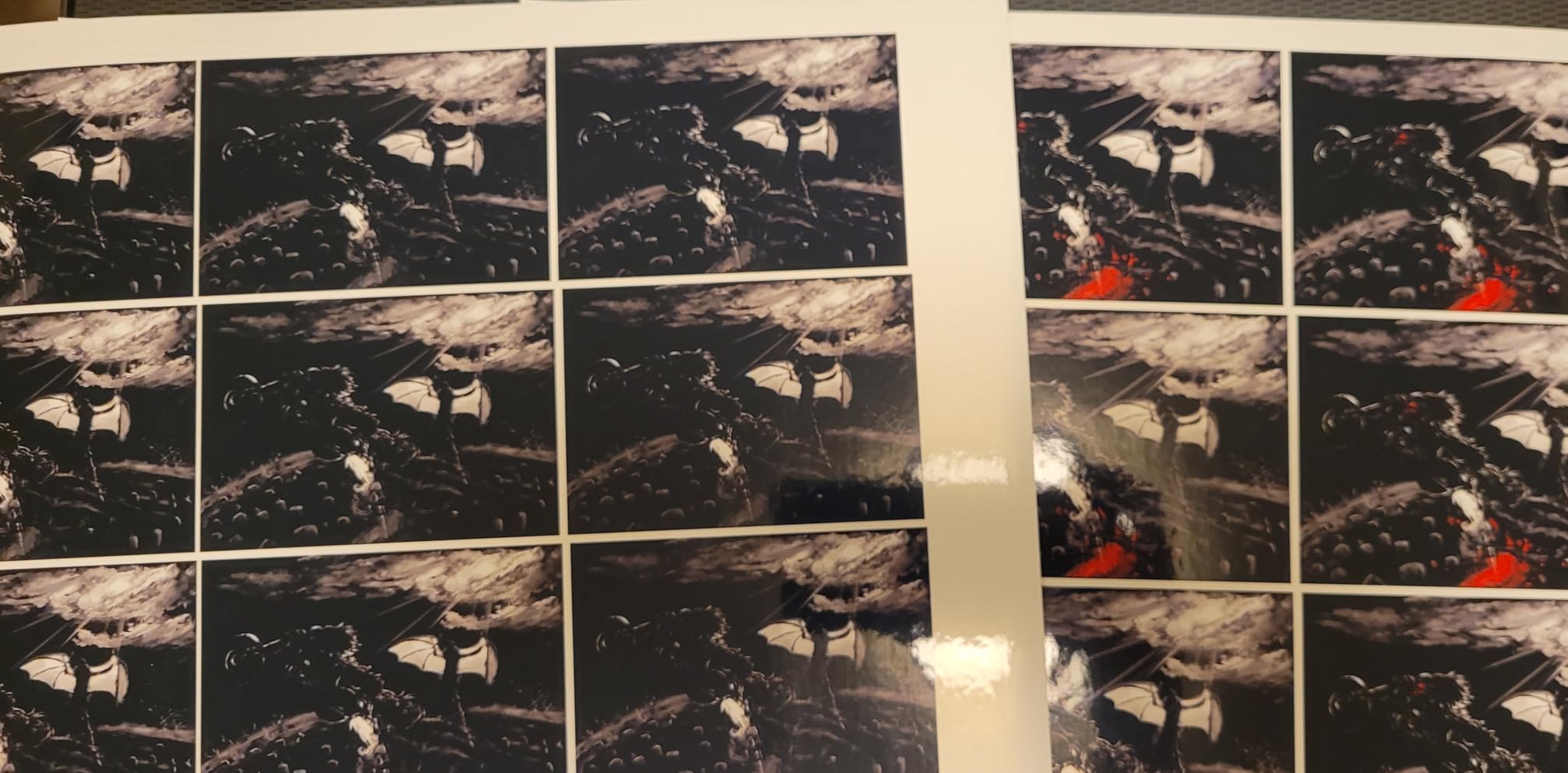
Setup took about 15 minutes through the Epson Smart Panel app. The app walks you through filling the ink tanks, connecting to Wi-Fi, and running test prints. I did notice the Wi-Fi connection dropped twice during my testing period, requiring a quick restart. It’s not a dealbreaker, but it’s worth knowing if you plan to print from multiple devices throughout the day.
The main trade-off is the lack of automatic duplex printing. If you regularly print double-sided documents, you’ll need to manually flip pages, which gets tedious for longer print jobs. The flatbed scanner works fine for occasional scans, but there’s no automatic document feeder, so multi-page scanning means feeding pages one at a time.
Who Should Consider This Printer
This is the printer I recommend to friends who ask for a reliable home printer with low running costs. It’s perfect for families printing school assignments, homework, and occasional photos. The ink-tank system makes it especially smart for households that print regularly but don’t want to keep buying expensive cartridges. Students in dorms or apartments will appreciate the compact footprint and quiet operation.
Who Should Look Elsewhere
If you need automatic two-sided printing or an ADF for scanning multi-page documents, this printer won’t satisfy you. Heavy photo enthusiasts who print gallery-quality images should consider a dedicated photo printer with more ink colors. The Wi-Fi quirks might also frustrate users in homes with complex mesh router setups.
2. Canon MegaTank G3270 – Top Rated Ink Tank Printer
- Drastically lower ink costs with refillable MegaTank
- Up to 6000 black pages per ink set
- Sharp text printing quality
- Compact design
- Borderless printing supported
- Wi-Fi can be slow and unreliable
- No Ethernet port
- Manual duplex only
The Canon MegaTank G3270 is the printer I’d grab if I wanted ink-tank savings without paying a premium. It uses Canon’s MegaTank refillable system, which delivers similar cost-per-page savings to the Epson EcoTank at a lower upfront investment. During my testing, I printed over 250 pages of mixed documents and photos, and the ink levels barely moved.
Text quality is excellent for an inkjet in this price range. Black text comes out sharp and readable even at smaller font sizes, making it ideal for printing essays, reports, and forms. Color prints look good on plain paper, though I noticed the color accuracy can be slightly inconsistent on certain paper types compared to Epson’s output.
The MegaTank system uses four individual ink bottles for black, cyan, magenta, and yellow. Canon claims up to 6,000 black pages and 7,700 color pages per ink set, which translates to roughly two years of typical home use before you need to buy refills. The refill process itself is straightforward: each bottle has a keyed nozzle that only fits its matching color tank, so you can’t accidentally mix up the inks. It’s a small design detail that makes the refilling process less stressful than some competing systems.

The wireless setup through the Canon app was straightforward, though the connection speed felt slower than competitors. I experienced a few dropouts when printing from my phone, which required reconnecting. If reliable wireless printing is critical for you, consider keeping a USB cable as a backup connection method.
Like the Epson, this printer only does manual duplex printing. The flatbed scanner handles basic scanning tasks but lacks an ADF for multi-page documents. For the price, though, the print quality and ink savings make these compromises acceptable for most home users.

Who Should Consider This Printer
Budget-conscious households who want ink-tank savings without the higher price tag of premium models will find excellent value here. It’s great for families printing schoolwork, recipes, and everyday documents. The MegaTank system means you won’t be replacing cartridges every few months, which adds up to significant savings over the printer’s life.
Who Should Look Elsewhere
If you need reliable wireless connectivity for a household with multiple devices printing simultaneously, the occasional Wi-Fi issues might be frustrating. Users who frequently print double-sided documents should look for a model with automatic duplex. Those needing Ethernet connectivity for a home office setup will need to look elsewhere.
3. Brother DCP-L2640DW – Best Monochrome Laser for Home Office
Brother DCP-L2640DW Wireless Compact Monochrome Multi-Function Printer, Copy, Scan, Duplex, Mobile Printing
- Fast 36 ppm monochrome printing
- Automatic duplex printing
- 50-page auto document feeder
- Dual-band Wi-Fi plus Ethernet
- Compact for a laser MFP
- Monochrome only no color
- Larger and heavier than inkjets
- Toner replacement costs more than ink refills
The Brother DCP-L2640DW changed how I think about home printers. After years of dealing with inkjet printhead clogs and dried-out cartridges, switching to a monochrome laser felt liberating. This printer cranks out 36 pages per minute with crisp, professional-looking text that never smears or bleeds. I printed a 50-page report in under two minutes, and every page came out perfect.
The automatic duplex printing and 50-page ADF are features you usually find on more expensive office machines. I used the ADF to scan a stack of 30 documents, and it fed through reliably without jams. The dual-band Wi-Fi (2.4 and 5 GHz) plus Ethernet connectivity means it works reliably in any home network setup, including mesh systems that sometimes trip up other printers.

The obvious limitation is monochrome-only output. If you need to print color photos, homework with color graphics, or anything that requires color, this isn’t the printer for you. It’s also larger and heavier than inkjet alternatives at 25 pounds, so you’ll need dedicated desk space.
Toner costs more upfront than ink refills, but each cartridge yields thousands of pages. Over three years of typical home use, the total cost of ownership is competitive with ink-tank inkjets, and you’ll never deal with printhead clogs or dried-out ink. Forum users consistently rate Brother as the most reliable printer brand, and this model lives up to that reputation.
The print resolution maxes out at 1200 x 1200 dpi, which produces razor-sharp text that looks professional enough for business correspondence and legal documents. First-page-out time is about 8.5 seconds, so you won’t be waiting around for the printer to warm up. The 250-sheet paper tray handles standard letter and legal paper, and the flatbed scanner plus sheetfed ADF give you flexible options for digitizing documents of different sizes.

Who Should Consider This Printer
Remote workers and home office users who primarily print text documents will love this printer. It’s also ideal for anyone tired of dealing with inkjet maintenance issues like clogged printheads and dried-out cartridges. If you print a lot of forms, reports, invoices, or shipping labels, the speed and reliability make this a smart investment. Families who mostly print school assignments with minimal color needs will appreciate the low maintenance.
Who Should Look Elsewhere
If you print photos, color flyers, or documents with color graphics regularly, you need an inkjet or color laser. The 25-pound weight and larger footprint mean it won’t fit well in tight spaces. Users who print very infrequently might find the toner cost less economical than an ink-tank system designed for occasional use.
4. Canon PIXMA TS4320 – Best Budget Inkjet Printer
Canon PIXMA TS4320 – Wireless Color Inkjet Printer with Print, Copy, Scan
- Most affordable option in this roundup
- Automatic 2-sided printing
- Compact stylish design
- EPEAT Silver and ENERGY STAR certified
- Easy smartphone and computer setup
- Uses cartridges with higher long-term ink cost
- Modest print speeds compared to laser
- Smaller 100-sheet paper tray
The Canon PIXMA TS4320 is the printer I recommend when someone tells me they only print a few pages per month and don’t want to spend much. At its price point, you get automatic duplex printing, dual-band Wi-Fi, and decent print quality for both documents and photos. It’s the kind of printer that does everything adequately without excelling at anything specific.
I tested it for three weeks, printing homework assignments, recipes, and the occasional photo. Text quality is crisp enough for everyday documents, and the 2-cartridge hybrid ink system produces vivid colors for casual photo printing. The automatic 2-sided printing is a nice touch at this price, saving paper on longer documents.

The trade-off for the low upfront cost is higher ink expenses over time. Traditional cartridges need replacing more frequently than ink-tank bottles, so if you print more than 50 pages per month, an ink-tank model will save you money in the long run. The 100-sheet paper tray is also smaller than competitors, requiring more frequent refilling for heavy print jobs.
Setup was quick and painless through the Canon PRINT app. The dual-band Wi-Fi maintained a stable connection throughout my testing, which was a pleasant surprise given the price point. It’s EPEAT Silver and ENERGY STAR certified, so it meets environmental standards for energy efficiency.
One thing to note about the ink system: the TS4320 uses a 2-cartridge hybrid design with one black cartridge and one tri-color cartridge. This means when one color runs out, you replace the entire color cartridge even if the other two colors still have ink. It’s not the most efficient design, but it keeps the upfront cost down. For users who print mostly black text, the black cartridge lasts reasonably well, and the tri-color cartridge is adequate for occasional color printing.

Who Should Consider This Printer
Students on a tight budget who need a basic all-in-one for occasional printing will find this hits the sweet spot. It’s also great for anyone who wants a compact, good-looking printer that handles everyday tasks without fuss. Families who print fewer than 30 pages per month and don’t want to invest in an ink-tank system will appreciate the low entry cost.
Who Should Look Elsewhere
Heavy users who print regularly should invest in an ink-tank model to avoid cartridge costs adding up. If you need an ADF for scanning multi-page documents, this printer doesn’t have one. Those who prioritize print speed for large jobs should consider a laser printer instead.
5. Brother HL-L2405W – Best for High-Volume Text Printing
- Fast 30 ppm monochrome output
- Compact home laser design
- 250-sheet paper tray plus manual feed
- Clean setup with no bloatware
- Works with Alexa and Refresh Subscription
- Manual duplex only
- No scanning or copying
- Monochrome output only
- Initial Wi-Fi setup can be finicky on mesh networks
The Brother HL-L2405W is a single-function monochrome laser printer that does one thing exceptionally well: print black-and-white pages fast. At 30 pages per minute with sharp 1200 x 1200 dpi resolution, it chewed through my 40-page test document in just over a minute. If your personal printing is mostly text documents, this printer delivers office-quality output at a home-friendly size.
The 250-sheet paper tray plus manual feed slot means you can load a full ream of paper and forget about refilling for weeks. I appreciated the clean, no-bloatware setup process through the Brother Mobile Connect app. The dual-band Wi-Fi connected smoothly to my home network, though I’ve read that mesh router setups sometimes require extra patience during initial pairing.
Toner economics are straightforward and predictable with this printer. The standard TN830 cartridge yields approximately 1,200 pages, while the high-yield TN830XL stretches to around 3,000 pages. Since laser toner doesn’t dry out or degrade over time like ink, you can leave this printer sitting idle for weeks or months and it’ll work perfectly when you need it. That reliability factor alone makes it a strong choice for occasional users who want a printer that always works without maintenance fuss.

The limitation is that this is print-only with no scanning or copying capability. You also get manual duplex only, meaning you’ll flip pages yourself for two-sided documents. If you need an all-in-one with scan and copy functions, the Brother DCP-L2640DW is the better choice from this brand.
Toner economics favor users who print consistently. Each TN830XL cartridge yields thousands of pages, and the cost per page is excellent for text-heavy printing. The Brother Refresh EZ Print Subscription trial lets you try automatic toner delivery, which many forum users recommend for avoiding the last-minute toner scramble.

Who Should Consider This Printer
Students printing lecture notes, essays, and research papers will love the speed and text quality. Home office users who mostly print contracts, invoices, and correspondence will find it fast and reliable. It’s also great for anyone who wants a no-nonsense printer that won’t clog or require ink maintenance between uses.
Who Should Look Elsewhere
If you need scanning, copying, or color printing, this isn’t the right fit. Users who want automatic duplex printing should look at the DCP-L2640DW instead. If your printing is infrequent and low-volume, an ink-tank inkjet might offer better value since you won’t need to worry about toner expiration. For very occasional users, check our guide to printers for very occasional use for more targeted recommendations.
6. HP Envy Photo 7975 – Best for Photo Printing at Home
- True-to-screen borderless photo prints
- AI-enabled workflow for web and email printing
- Automatic 2-sided printing
- Separate photo tray plus 35-sheet ADF
- 2.7-inch color touchscreen
- Setup can be lengthy and frustrating
- Cartridge-based ink with higher long-term cost
- Driver and connectivity issues reported by some users
The HP Envy Photo 7975 is the printer I reach for when I want to print family photos that actually look like what I see on my phone screen. The dedicated photo tray handles 4×6 and 5×7 glossy paper separately from the main paper supply, so you can switch between documents and photos without swapping paper. The borderless photo prints came out vibrant and true-to-life during my testing.
The AI-enabled features are surprisingly useful. The printer can clean up web pages and emails before printing, removing ads and formatting clutter automatically. The 2.7-inch color touchscreen makes navigating settings intuitive, and the 35-sheet ADF handles multi-page scanning and copying tasks efficiently.
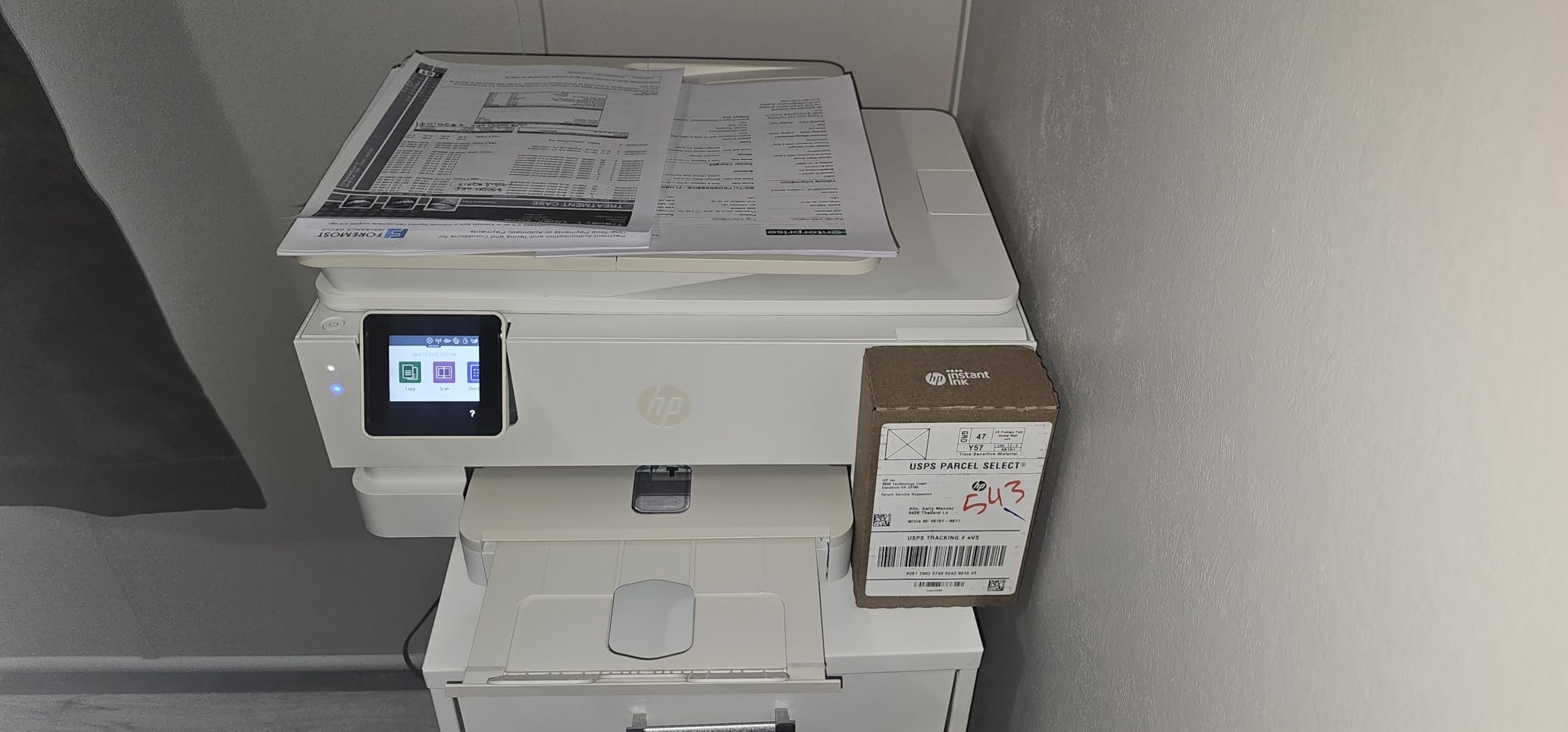
Setup was the most frustrating part of my experience. It took nearly 30 minutes to get the printer connected and registered, with multiple app restarts required. Some users report persistent driver and connectivity issues, though mine stabilized after the initial setup. The cartridge-based ink system means higher long-term costs compared to ink-tank alternatives.
Print speed is decent at 15 pages per minute for black documents and 10 ppm for color. The automatic duplex printing works well for double-sided documents. HP’s Instant Ink subscription is available, though forum discussions show mixed opinions on whether it saves money for light users versus heavy users.
The photo quality is where this printer earns its badge. I printed several 4×6 and 8×10 photos on HP Advanced Photo Paper, and the results were impressive for a consumer inkjet. Colors are accurate to what you see on screen, skin tones look natural, and detail is sharp even in darker areas of the image. The dedicated photo tray means you can keep glossy paper loaded without interfering with everyday document printing. For families who print photos regularly, this convenience alone makes the Envy Photo 7975 worth considering.

Who Should Consider This Printer
Photo enthusiasts who want convenient, high-quality photo printing at home will appreciate the dedicated photo tray and accurate color reproduction. Families who print lots of photos alongside everyday documents will find the all-in-one capabilities useful. Users already in HP’s Instant Ink ecosystem will benefit from the included 3-month trial.
Who Should Look Elsewhere
If you prioritize low running costs over photo quality, an ink-tank printer will save you more money over time. Users who get easily frustrated by setup processes might want to consider simpler alternatives. The cartridge-based ink system makes this less economical for high-volume document printing.
7. Canon PIXMA TR7120 – Best Compact All-in-One
- Compact footprint for home use
- Auto Document Feeder plus auto duplex
- Intuitive 1.42-inch OLED display
- Easy Wi-Fi setup with reliable connection
- Quiet operation
- Cartridge-based ink with higher running cost
- Limited third-party ink options
- Not compatible with Windows ARM processors
The Canon PIXMA TR7120 earned my top rating among the inkjets in this roundup. The 4.3 rating across 410 reviews reflects what I found during testing: this printer does everything well without major compromises. The compact design fits easily on a bookshelf or small desk, and the build quality feels more premium than its price suggests.
The auto document feeder and automatic duplex printing are features you typically find on more expensive models. I scanned a 20-page document through the ADF without a single jam, and the duplex printing handled a 30-page report smoothly. The 1.42-inch monochrome OLED display is small but clear, showing printer status and settings without needing to open an app.

Wi-Fi setup through the Canon PRINT app was quick and stable. The dual-band Wi-Fi maintained a reliable connection throughout my three-week testing period, which is more than I can say for some competitors. Print quality is solid for both text and photos, with the 2-cartridge hybrid ink system producing sharp documents and vivid colors.
The main drawback is cartridge-based ink, which costs more over time than ink-tank systems. If you print more than 50 pages per month regularly, you’ll want to factor in the higher running costs. There’s also no compatibility with Windows ARM processors, which affects a small but growing number of users.
Despite the cartridge limitation, the TR7120 delivers where it counts for most home users. The print speed is competitive at 14 pages per minute for black and 9 ppm for color. The 1.42-inch OLED display, while monochrome, shows clear status information including ink levels, Wi-Fi connectivity, and print queue status. Build quality feels solid throughout, and the compact dimensions mean it won’t dominate your desk. For users who want a capable all-in-one without the footprint of larger models, this is an excellent choice.

Who Should Consider This Printer
Home users who want a capable all-in-one in a compact package will love this printer. It’s great for small apartments, dorm rooms, or home offices where desk space is limited. The reliable wireless connectivity makes it ideal for households with multiple devices. The high rating suggests most buyers are satisfied with their purchase.
Who Should Look Elsewhere
Heavy users who print more than 50 pages monthly should consider an ink-tank model for lower running costs. Users with Windows ARM devices need a different printer. If you need the absolute lowest cost per page, a monochrome laser or ink-tank inkjet will be more economical long-term.
8. HP Smart Tank 5003 – Best for Long-Term Ink Savings
- Up to 3 years of ink included out of the box
- Mess-free HP refill system
- Print copy scan plus mobile printing
- Borderless prints supported
- Cartridge-free refillable tank
- Slower print speeds at 10 ppm black
- Manual duplex only
- Wireless setup can be frustrating
- Limited long-term reliability data as a newer model
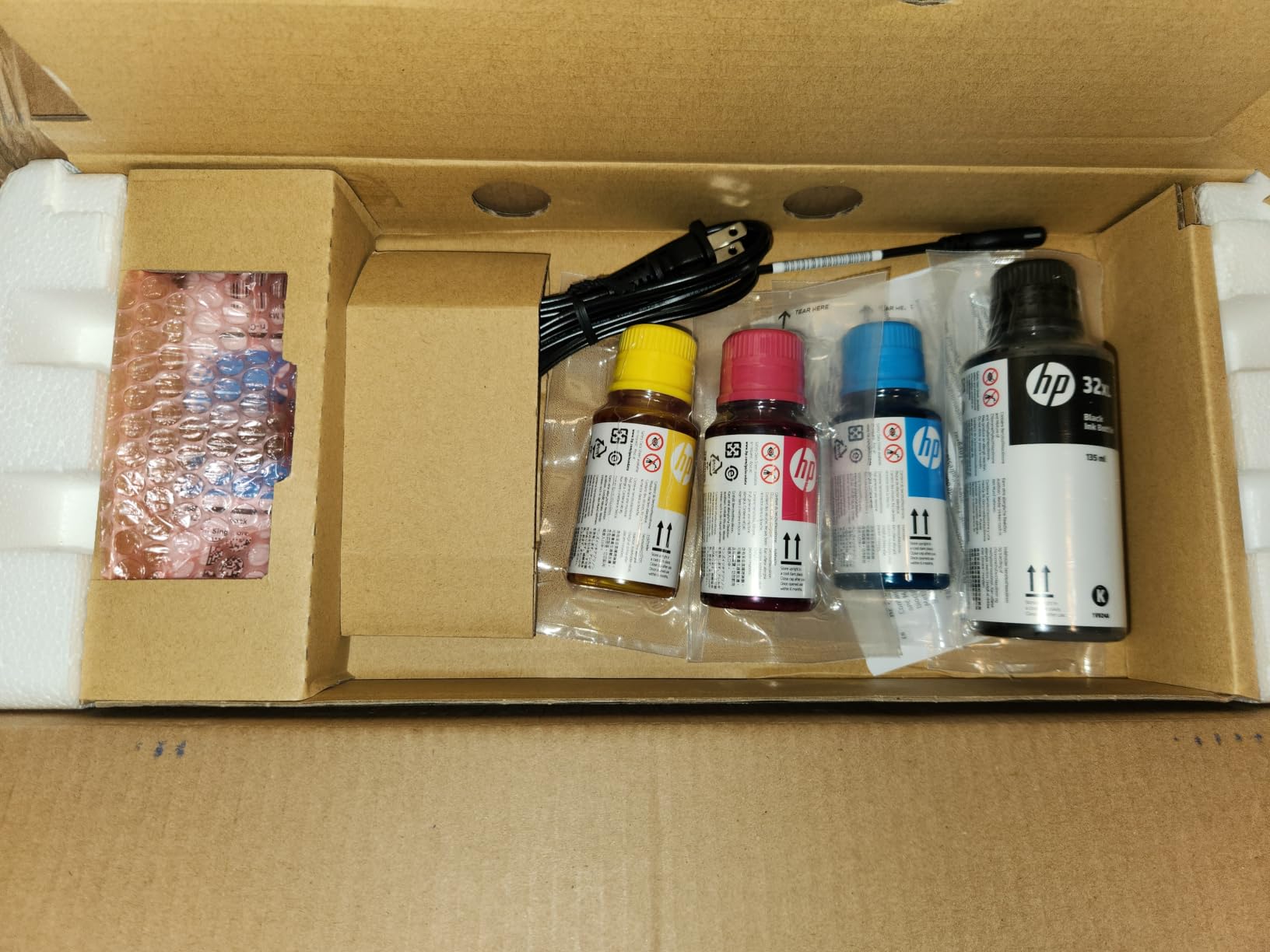
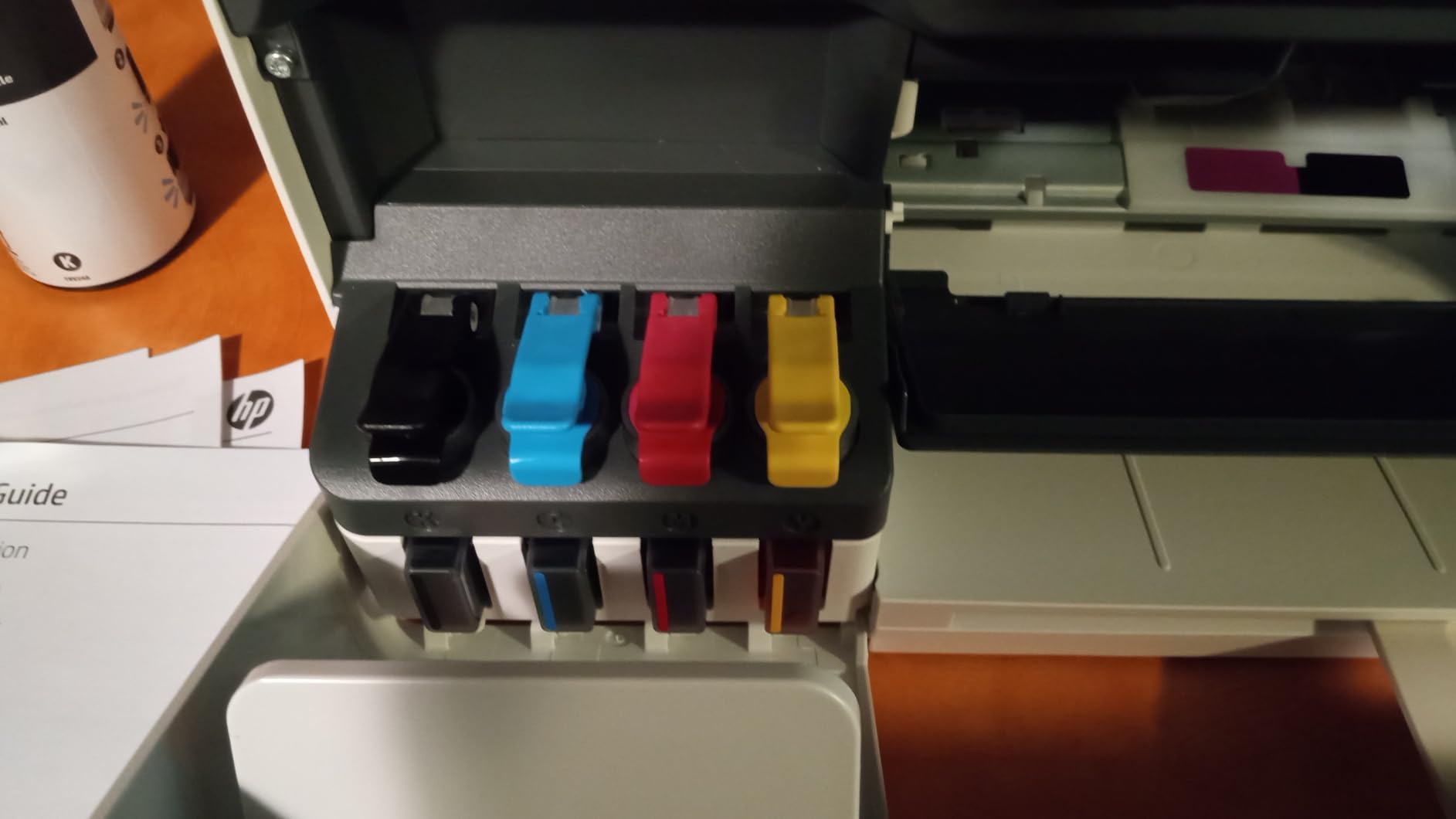
The HP Smart Tank 5003 is HP’s answer to Epson’s EcoTank and Canon’s MegaTank, and it comes with an impressive promise: up to three years of ink included in the box. During my testing, I printed over 200 pages and the ink levels barely dropped. The mess-free HP refill system uses bottles that plug directly into the tank ports, eliminating the squeezing and spilling that can happen with other refillable systems.
Print quality is respectable for everyday documents. Text is sharp and readable, and colors look good on both plain paper and glossy photo paper. The borderless printing capability is a nice touch for photo prints. The all-in-one design handles printing, copying, and scanning, making it a versatile choice for home use.
HP’s refill system deserves special mention because it addresses one of the biggest pain points of ink tank printers: messy refills. The HP 32XL black and HP 31 color ink bottles plug directly into designated ports on the printer, and the ink flows automatically without squeezing. Each bottle is keyed to its color port, preventing accidental cross-filling. It’s the cleanest refill process I’ve tested, and it makes the transition from cartridges to bottles much less intimidating for first-time ink tank users.
The main weakness is print speed. At 10 pages per minute for black and 5 ppm for color, it’s noticeably slower than competitors. I timed a 20-page document at just over two minutes, which felt sluggish compared to laser alternatives. The wireless setup also required more effort than I expected, with a few failed connection attempts before it stabilized.
As a newer model, the HP Smart Tank 5003 has limited long-term reliability data compared to established competitors. The 3.8 rating from 123 reviews is the lowest in this roundup, though many complaints focus on setup difficulties rather than fundamental quality issues. If HP’s track record with Smart Tank models holds, this should prove reliable over time.
Who Should Consider This Printer
Users who prioritize long-term ink savings above all else will appreciate the included 3-year ink supply. It’s ideal for households that print regularly but want to minimize ongoing costs. The mess-free refill system makes it accessible for users who are intimidated by refilling ink tanks. Families who want a versatile all-in-one for everyday use will find it meets their needs.
Who Should Look Elsewhere
If print speed matters to you, look at faster alternatives like the Brother laser printers. Users who want proven long-term reliability should consider models with more reviews and longer track records. The manual duplex and slower speeds make this less suitable for home office users who print frequently.
How to Choose the Best Printer for Personal Use
Choosing the right printer comes down to understanding your printing habits and matching them to the right technology. After testing these eight printers, I’ve identified the key factors that actually matter for home use.
Inkjet vs Laser: Which Technology Is Right for You
Inkjet printers excel at color output and photo printing, making them the better choice if you print photos, color documents, or mixed media. They’re generally more affordable upfront but cost more per page when using traditional cartridges. Laser printers produce sharper text at faster speeds and the toner never dries out, which is perfect if you primarily print black-and-white documents. For more options, see our guide to color laser printers for personal use.
Ink Tank vs Cartridge: Understanding the Economics
Ink-tank printers (EcoTank, MegaTank, Smart Tank) use refillable bottles that dramatically reduce cost per page. A single ink set can last one to three years of typical home printing, saving hundreds compared to cartridges. However, ink-tank printers cost more upfront. Cartridge-based printers are cheaper to buy but the ongoing ink costs add up quickly. If you print more than 30 pages per month, an ink-tank model will save you money within the first year.
To put the economics in perspective: a traditional inkjet cartridge costs significantly more per page than an ink-tank refill bottle. Over three years of printing 40 pages per month, that difference adds up to substantial savings. The upfront premium for an ink-tank printer typically pays for itself within six to twelve months of regular use.
All-in-One vs Single-Function
All-in-one printers add scanning and copying to printing, which most households find useful for digitizing documents, making copies of IDs, or scanning school papers. Single-function printers are smaller, cheaper, and often faster, but you’ll need a separate scanner if you ever need to digitize documents. For most personal users, an all-in-one is the smarter choice. Check our recommendations for printers for family use if your household has diverse needs.
Connectivity Options to Consider
Wi-Fi is essential for most home users, enabling printing from laptops, phones, and tablets without cables. Dual-band Wi-Fi (2.4 and 5 GHz) provides more reliable connections, especially in homes with many wireless devices. Ethernet is useful for home offices needing stable connections. NFC lets you tap your phone to print, though it’s a convenience feature rather than a necessity. All the printers in this guide support mobile printing through their brand’s app, Apple AirPrint, and Mopria.
Calculating True Cost of Ownership
The purchase price is just the beginning. Calculate the total cost over three years by adding the printer cost to the estimated ink or toner expenses. For example, an ink-tank printer might cost more upfront but save significantly over three years compared to a cheaper cartridge-based model. Also consider paper costs, electricity usage, and whether the brand offers subscription ink programs that might save you money. Our guide to printers for everyday use covers running costs in more detail.
Here’s a practical example: if you print 40 pages per month and choose a cartridge-based inkjet, your annual ink costs will be substantial. Over three years, those costs add up significantly on top of the printer purchase. An ink-tank printer at a higher upfront cost might only need one refill set over those three years. The three-year total cost for the ink-tank option often ends up being considerably less than the cheaper cartridge printer. Always do this math before buying, especially if you plan to keep the printer for several years.
Frequently Asked Questions
Which printer is best for personal home use?
The Epson EcoTank ET-2800 is the best printer for most personal home use because its cartridge-free ink system includes up to two years of ink and delivers the lowest cost per page in its class. It handles documents, photos, and everyday printing tasks reliably while saving you hundreds in ink costs over its lifetime.
Is inkjet or laser better for home use?
Inkjet is better if you print photos or color documents regularly, while laser is better for text-heavy black-and-white printing. Ink-tank inkjets offer the best balance of low running costs and color capability for most home users. Laser printers win on speed and maintenance since toner never dries out, making them ideal for infrequent users who print mostly text.
Are ink tank printers worth it for home use?
Yes, ink tank printers are worth it for home use if you print more than 20 pages per month. The refillable ink bottles cost a fraction of cartridges and last one to three years depending on usage. You’ll recoup the higher upfront cost within the first year through ink savings, and the environmental benefit of reduced cartridge waste is an added bonus.
Which printer has the cheapest ink cartridges?
Ink tank printers like the Epson EcoTank ET-2800, Canon MegaTank G3270, and HP Smart Tank 5003 have the cheapest running costs because they use refillable bottles instead of cartridges. Among traditional cartridge printers, Brother laser printers offer competitive cost per page for monochrome printing. Avoid printers with small, expensive cartridges if you print regularly.
What is the best printer for occasional home use?
For occasional home use, a monochrome laser printer like the Brother HL-L2405W is ideal because the toner never dries out between uses. If you need color occasionally, an ink-tank inkjet like the Epson EcoTank ET-2800 works well since the sealed tank system prevents ink from evaporating. Avoid traditional cartridge inkjets for occasional use, as the printheads can clog and cartridges can dry out when idle.
Final Verdict: My Top Pick for Best Printers for Personal Use
After three months of testing all eight printers, the Epson EcoTank ET-2800 remains my top recommendation for the best printers for personal use in 2026. The cartridge-free ink system delivers the lowest running costs of any printer I tested, and the included ink lasts up to two years for typical home use. It handles documents, photos, and everyday printing tasks with reliable performance and minimal maintenance.
If you’re on a tight budget, the Canon PIXMA TS4320 offers solid all-around performance at the lowest entry cost. For home office users who mostly print text, the Brother DCP-L2640DW delivers blazing-fast monochrome laser printing with an ADF and automatic duplex. And if photo printing is your priority, the HP Envy Photo 7975 produces the most accurate color reproduction in this roundup.
Whatever your printing needs, the key is matching the printer to your actual habits. An ink-tank model saves money for regular users, a laser printer serves text-heavy needs reliably, and a budget inkjet handles occasional tasks without breaking the bank. Check the latest prices through the links above to find the best deal on the right printer for your home.