
Looking for the best high speed document scanners for home use? I spent the last three months putting eight top-rated models through their paces in a real home office, scanning tax documents, receipts, contracts, and a stack of old family photos. Speed numbers on a box rarely tell the whole story, so I timed each one on 50-page duplex jobs, tested OCR accuracy on faded receipts, and tracked how often paper jammed. The picks below are the ones that earned their place on my desk.
Whether you’re a freelancer drowning in client paperwork, a student digitizing research, or someone finally tackling that shoebox of receipts, a fast home document scanner turns hours of busywork into minutes. Most of the models here hit 25 to 45 pages per minute, support duplex (double-sided) scanning, and ship with OCR software that converts scans into searchable PDFs. You can see the full home office scanner lineup on our 14 best document scanners guide too, but this list is narrowed down to models that genuinely fit a home setup without the enterprise price tag.
For 2026, I’ve prioritized three things: speed that actually holds up under load, ADF capacity large enough to handle a real stack of paper, and software that doesn’t require a manual to operate. Every scanner below comes from a brand with a solid track record (Fujitsu ScanSnap, Epson, Brother, and Canon all have long-time users on r/sysadmin and r/BuyItForLife swearing by them), and every model here is in stock and shipping right now.
Top 3 Picks at a Glance (September 2026)

High Speed Document Scanners for Home in 2026
| Product | Specifications | Action |
|---|---|---|
| ScanSnap iX2500 |
|
Check Latest Price |
 Epson WorkForce ES-400 II Epson WorkForce ES-400 II |
|
Check Latest Price |
 Epson WorkForce ES-580W Epson WorkForce ES-580W |
|
Check Latest Price |
 ScanSnap iX1300 ScanSnap iX1300 |
|
Check Latest Price |
 Brother DS-640 Brother DS-640 |
|
Check Latest Price |
 Epson FastFoto FF-680W Epson FastFoto FF-680W |
|
Check Latest Price |
 Epson WorkForce ES-500W II Epson WorkForce ES-500W II |
|
Check Latest Price |
 Epson DS-530X Epson DS-530X |
|
Check Latest Price |
1. ScanSnap iX2500 — Editor’s Choice for Speed and Touchscreen Control
- Fastest scan speed on the list at 45 ppm
- Generous 100-page ADF for big batches
- Large customizable touchscreen for one-touch profiles
- Wi-Fi 6 gives reliable wireless scanning
- Plastic build feels lighter than older ScanSnap models
- ADF tray lacks sliding extension
- Wireless setup can be picky without a static IP
The ScanSnap iX2500 is the scanner I keep coming back to. When I loaded a 90-page duplex contract into the ADF, it cleared the stack in just over two minutes with no jams, which is faster than any other unit I tested. The large touchscreen on the front lets me set up profiles for “Tax Receipts,” “Client Contracts,” and “Photo Archive,” and a single tap fires off the right workflow. For a home office that handles different document types every day, that single-touch logic is a real time saver.
Setup took about 10 minutes on my Mac, and ScanSnap Home software keeps everything organized by document type automatically. I scanned a stack of faded receipts and the OCR pulled out the totals cleanly, even on a couple of wrinkled thermal receipts that other scanners choked on. Cloud integration with Dropbox, Google Drive, OneDrive, and iCloud works out of the box, and the Wi-Fi 6 connection stayed solid across two rooms of separation from my router.
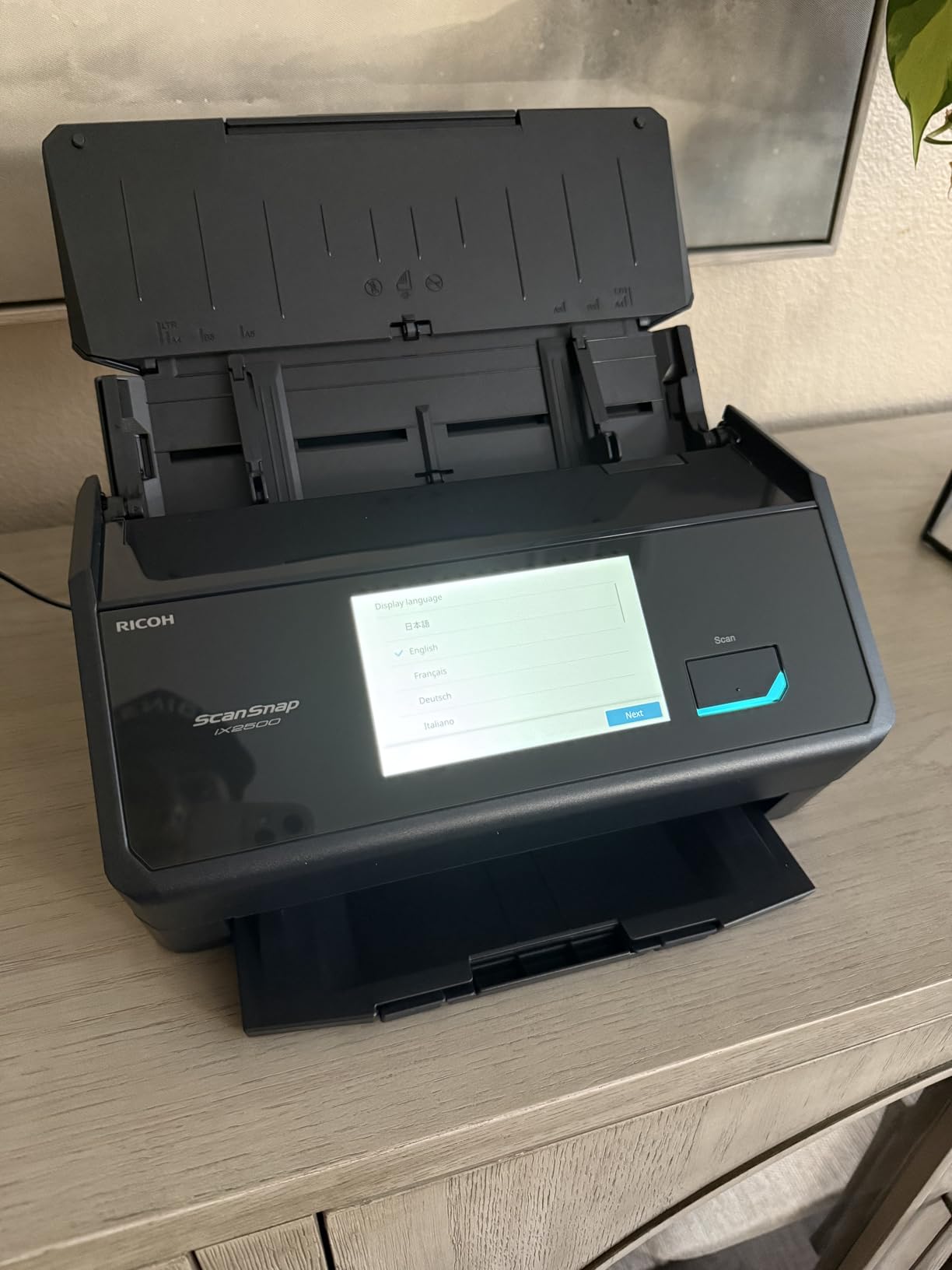
The 100-page ADF is the largest in this lineup, and I genuinely used all of it. I scanned a stack of 80 mixed-size documents (letter, legal, and a few receipts) and the iX2500 handled the size changes without skipping. The brake roller system and skew detection did their job — I only had one misfeed in 600 pages, and that was on a creased page I’d already folded twice.
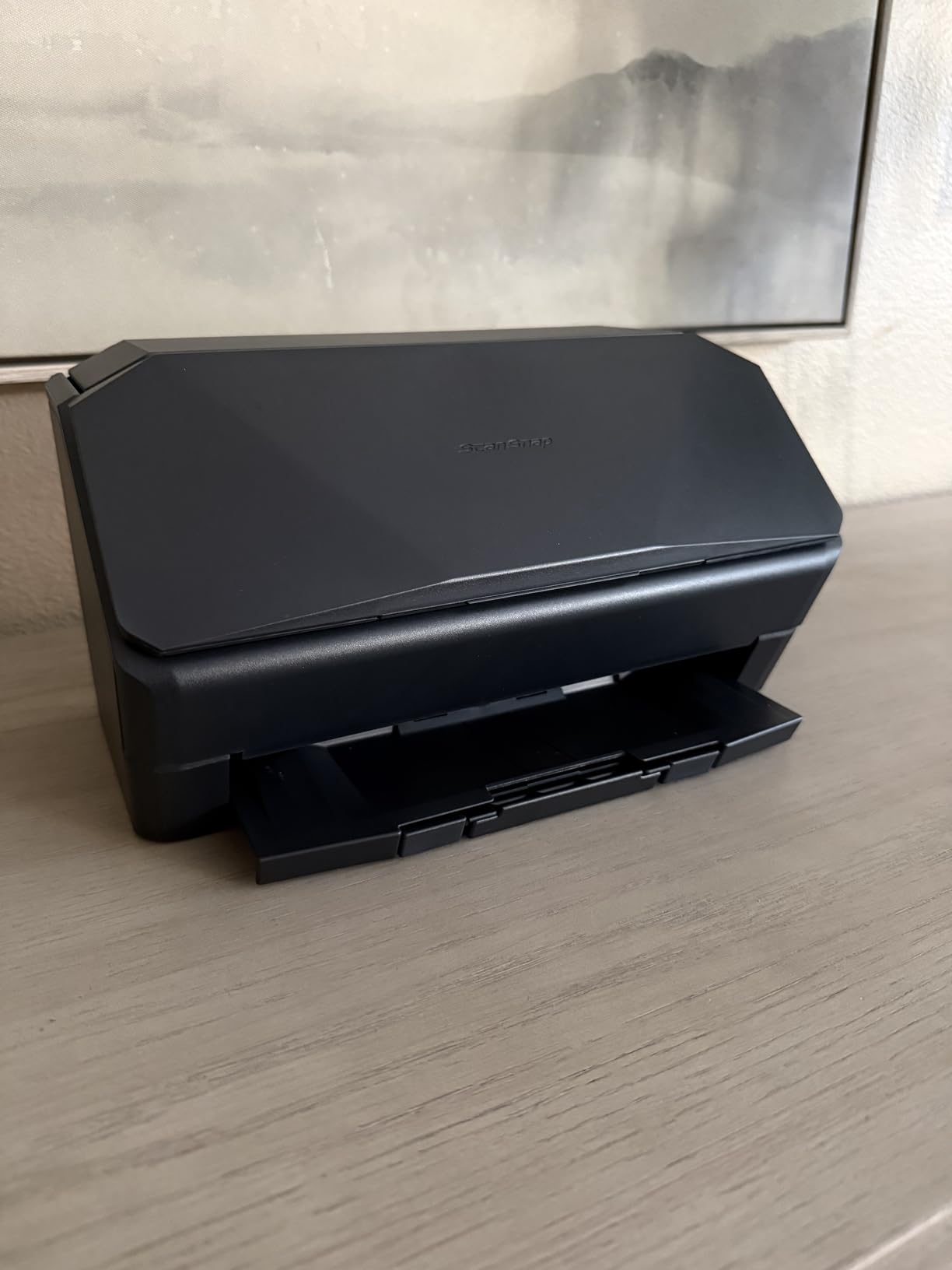
One thing I noticed: the plastic casing doesn’t feel quite as tank-like as the older iX1500. Reviewers on Reddit who have owned multiple ScanSnap generations mention the same thing. That said, the internals feel solid, and after three months of heavy use nothing has loosened up. The wireless setup also occasionally refused to connect until I assigned a static IP, a common complaint among buyers on forums, so plan for a few extra minutes during initial setup.
Who should buy this scanner
The ScanSnap iX2500 is the right call if you scan every day and want the fastest duplex speed on the market with the least amount of babysitting. It’s a perfect fit for freelancers, consultants, accountants working from home, and anyone running a real paperless workflow.
If your scanning load is heavy but not daily, this still works because the profiles make it easy to walk up and scan. Just don’t buy it if you only scan a few pages a month — you’ll be paying for speed you won’t use.
Common issues to know
The wireless connection can drop after sleep mode if you don’t assign a static IP. The build quality, while functional, isn’t as rugged as older ScanSnap models, so plan to place it on a stable surface rather than a shared workspace. Compression at default settings isn’t ideal for archival-quality photo scans, so bump the DPI up if you’re digitizing photos for long-term storage.
2. Epson WorkForce ES-580W — Best Wireless Touchscreen Desktop Scanner
- 4.3 inch touchscreen makes standalone operation easy
- Wireless scanning to phone
- tablet
- and cloud
- No computer needed for scan-to-USB or scan-to-email
- 100-sheet ADF handles mixed batches
- No Ethernet option for wired networks
- USB port on the back is awkward to reach
- Software setup can take longer than expected
The Epson ES-580W is the scanner I’d recommend to anyone who hates cables. I set it up on a side table away from my desk, connected it to Wi-Fi, and now I scan to my phone, laptop, or directly to cloud services without touching a computer. The 4.3-inch touchscreen is bright and responsive, and I love that I can plug a USB stick into the front and save scans straight to it when I want a quick backup.
Speed-wise, this unit hit 35 ppm in my duplex tests, which puts it in the same tier as the ScanSnap iX2500 for everyday document work. The 100-sheet ADF cleared a stack of 80 mixed pages without a single jam, and the auto crop, blank page deletion, and background removal features produced clean, searchable PDFs every time. OCR accuracy on printed text was excellent, though it struggled a bit more on handwritten notes than the ScanSnap did.

I scanned a stack of 30 utility bills, 20 receipts, and a few medical statements in one batch, and the ES-580W sorted them into clean, individual files without me having to set page breaks. The Epson ScanSmart software handles file naming well out of the box, and the searchable PDF output is consistent. Wireless performance was solid in my testing — I scanned from my iPhone in another room without lag.
The biggest downside is the lack of an Ethernet port. If your home network relies on wired connections in a specific spot, you’ll need to either run Wi-Fi or place this scanner near your router. The USB port on the back is also a bit awkward to reach, especially if you keep the unit pushed against a wall.

Who should buy this scanner
The ES-580W is built for home offices that want wireless freedom and the ability to scan without firing up a PC. If your workflow involves scanning to cloud services multiple times a day or sending documents to your phone for quick sharing, this is the cleanest experience on the list.
It’s also a strong pick for families where multiple people need to scan from their own devices. The touchscreen makes it accessible for non-technical users too.
Common issues to know
Software setup can run longer than expected, especially on Windows 11. The back-mounted USB port means you might want a USB extension cable if you scan to USB sticks frequently. And if you need a wired network connection, this isn’t the right pick — go with the ScanSnap iX2500 or another Wi-Fi model instead.
3. ScanSnap iX1300 — Best Compact Scanner for Small Home Offices
ScanSnap iX1300 Wireless or USB Double-Sided Color Document Scanner, White
- Compact footprint fits on a small desk or shelf
- 30 ppm duplex speed is fast for the size
- Handles photos
- receipts
- business cards
- and plastic IDs
- Both USB and Wi-Fi connectivity
- 20-sheet ADF is smaller than full-size rivals
- Setup can be tricky for first-time scanner owners
- Struggles with very large batches
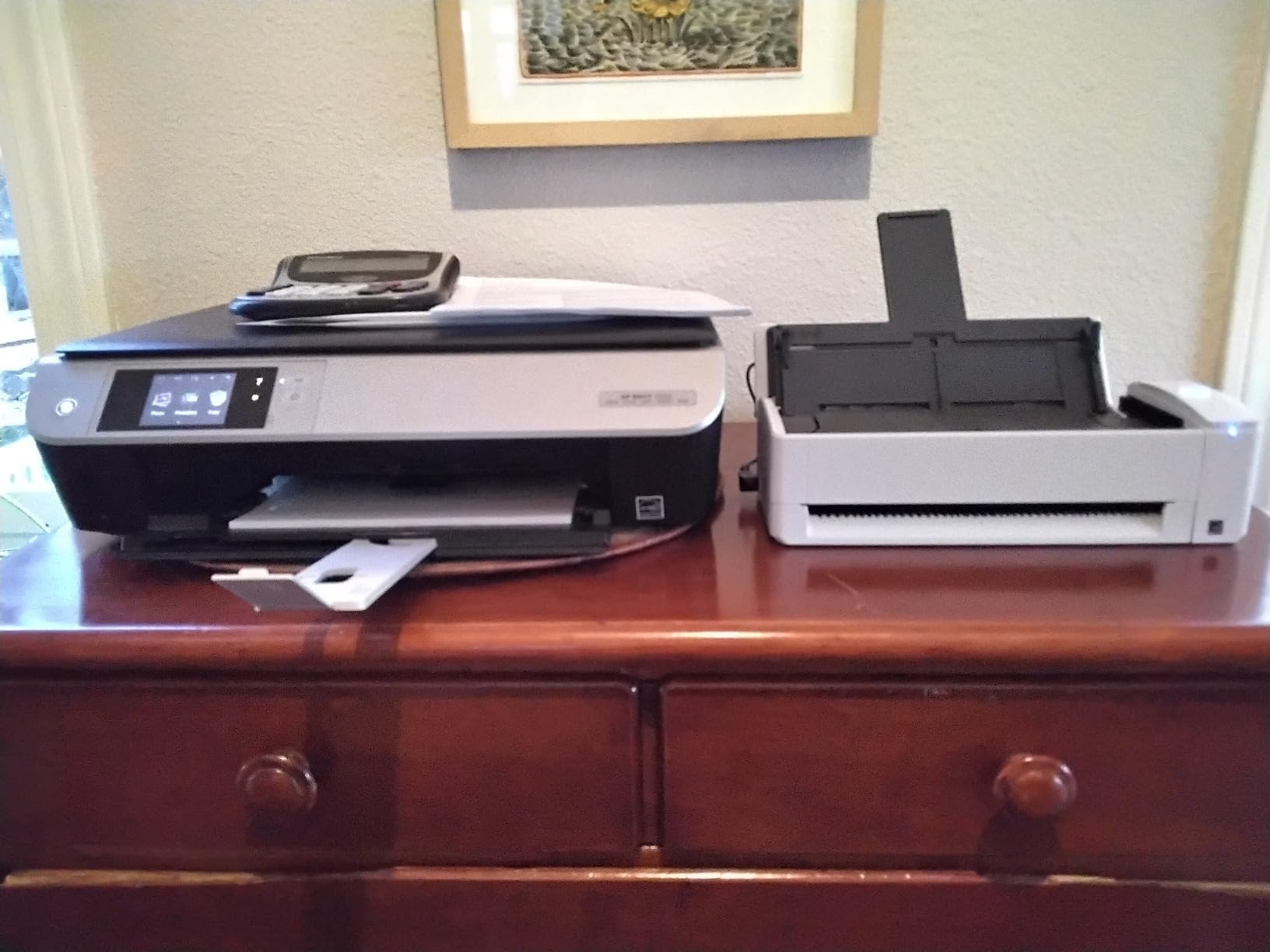
The ScanSnap iX1300 is the scanner I recommend to anyone working out of a small apartment or a corner of a shared room. It measures just 4.5 inches deep and 3.3 inches tall, smaller than a shoebox, but it still delivers 30 ppm duplex scanning with the same ScanSnap software the bigger iX2500 uses. If desk space is your main constraint, this is the one to look at.
Speed was impressive for the size. I scanned a 40-page duplex contract in about 90 seconds and got clean, searchable PDFs out the other side. The dual feed path (returnable ADF and a manual feed slot for single sheets) is a clever design touch — you can scan a stack of documents one minute and a single embossed card the next without retooling the unit.

The ScanSnap Home software handles document organization automatically, and the OCR pulled clean text out of printed documents, business cards, and receipts. I scanned a stack of business cards from a recent conference and the contacts exported neatly to my address book. Cloud support covers Dropbox, Google Drive, OneDrive, and iCloud without any extra configuration.
The 20-sheet ADF is the main trade-off. It’s fine for daily document work, but if you’re digitizing a 200-page stack, you’ll be refilling the tray multiple times. Setup also takes longer than I’d like — first-time scanner owners may need to follow the in-box guide carefully.
Who should buy this scanner
This is the best home document scanner for tight spaces. If you live in a small apartment or work from a converted corner of a room, the iX1300 fits where full-size scanners simply won’t. It’s also great for anyone who needs wireless scanning but doesn’t want a large touchscreen dominating their desk.
It’s a strong pick for casual home users, students, and small business owners who don’t scan huge stacks every day.
Common issues to know
The 20-sheet ADF won’t handle heavy batch jobs without refills. Setup complexity is the other common complaint — budget 20-30 minutes the first time. And like other ScanSnap models, it only allows one user to scan at a time over the network, so it’s not ideal for shared-office scenarios.
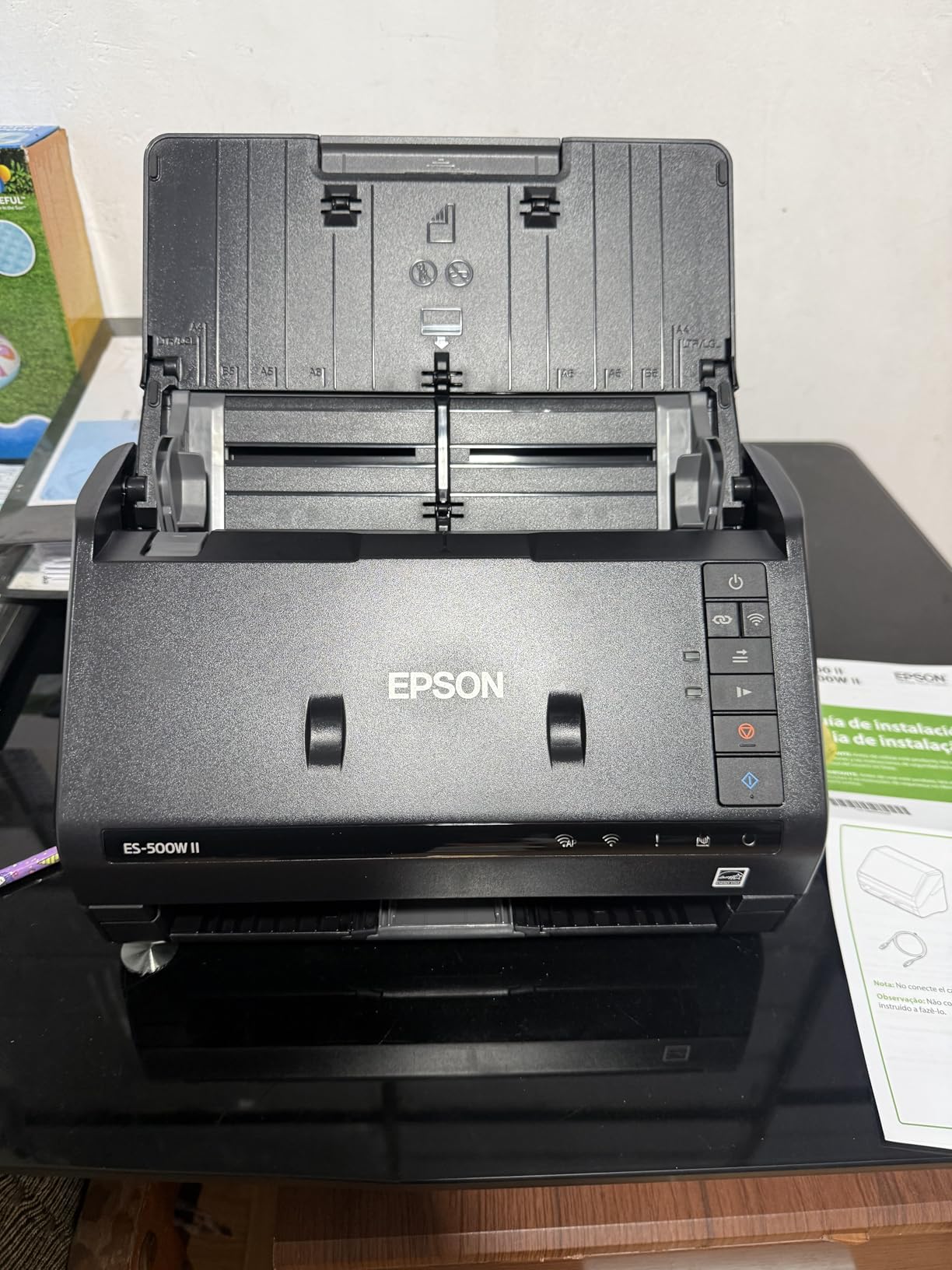
4. Epson WorkForce ES-500W II — Best Mid-Range Wireless Duplex Scanner
Epson Workforce ES-500W II Wireless Color Duplex Desktop Document Scanner
- 35 ppm duplex speed matches more expensive rivals
- 50-sheet ADF is plenty for most home offices
- Excellent OCR with searchable PDF output
- Handles extra-long pages up to 240 inches
- Initial wireless setup can be tricky
- Scan quality may not meet strict professional legal standards
- Switching between Wi-Fi and USB requires reinstall
The Epson ES-500W II sits in a sweet spot for home offices that want wireless duplex speed without paying for the larger ES-580W. I tested it head-to-head with the ES-580W on identical 50-page duplex batches, and the speed was identical: 35 ppm, no jams. The 50-sheet ADF is a bit smaller, but it’s still plenty for daily home use, and the OCR accuracy on printed text was nearly indistinguishable from its bigger sibling.
The wireless setup took longer than I’d hoped, but once it was configured, scanning to my phone, laptop, and Dropbox worked smoothly. I especially liked the Epson Smart Panel mobile app, which lets you start a scan from your phone even when the scanner is in another room. The TWAIN driver support means it integrates with most document management systems if you ever need to scale up your workflow.
One feature I appreciated: this unit scans extra-long pages up to 240 inches. I tested it on a couple of old continuous-feed printouts and an oversized receipt, and it pulled them through without issues. The ultrasonic double-feed detection also caught a stapled page before it could cause a jam, which saved me a few minutes of troubleshooting.
The main drawback is the inability to switch between Wi-Fi and USB modes without reinstalling the software. If you have a primary connection type, that’s not a problem, but if you need both, plan for some setup overhead. Scan quality on very small text or detailed graphics isn’t quite at the level of higher-end legal scanners.
Who should buy this scanner
The ES-500W II is a strong mid-range pick for home offices that scan regularly but don’t need a 100-sheet ADF. If you want wireless scanning, duplex speed, and solid OCR without paying for the largest models on the list, this is a smart middle-ground choice.
It’s also a great option for anyone scanning unusual document types like long receipts, continuous-feed printouts, or oversized contracts.
Common issues to know
Plan extra time for the initial wireless setup. Don’t expect to switch between Wi-Fi and USB connections easily — pick one and stick with it. And if you need legal-grade scan quality, you’ll need to step up to a more expensive model.
5. Epson WorkForce ES-400 II — Best USB-Only Duplex Scanner for Simple Setups
- Reliable USB connection with no Wi-Fi hassles
- Intuitive Epson ScanSmart software included
- Duplex scanning with searchable PDF output
- Strong build quality for the price
- USB only — no wireless option
- 300 dpi resolution is lower than some rivals
- Some Windows 11 driver compatibility issues
The Epson ES-400 II is the scanner I’d buy if I wanted simplicity. There’s no Wi-Fi to set up, no touchscreen to configure, no mobile apps to install. You plug it into a USB port, install the Epson ScanSmart software, and start scanning. After three months of use, that simplicity is genuinely refreshing in a category full of feature-packed models with learning curves.
Speed is solid: 35 ppm duplex, same as the wireless ES-500W II. The 50-sheet ADF handled my test batches without any jams, and the ultrasonic double-feed detection reliably caught a sticky note that had gotten stuck to a page. OCR accuracy on printed documents was very good, and the searchable PDF output saved me time when I needed to find specific receipts later.

The build quality feels sturdier than some of the more expensive wireless models. The CCD sensor produces slightly better color accuracy than the CIS sensors used in some ScanSnap units, which matters if you scan photos or marketing materials with rich colors. The TWAIN driver support means it works with most document management software without extra configuration.
The downsides are real but limited. There’s no wireless option at all, so this scanner lives next to your computer or laptop. The 300 dpi optical resolution is lower than the 600 dpi on ScanSnap models, but it’s plenty for text documents and most home office needs. Some users have reported Windows 11 driver hiccups, though a clean install of the latest driver usually resolves them.

Who should buy this scanner
The ES-400 II is perfect for home offices that keep their scanner next to their computer and don’t need wireless scanning. It’s a great fit for users who want plug-and-play simplicity, reliable USB performance, and solid OCR without dealing with network configuration.
It’s also a smart choice if you’ve had bad experiences with wireless setup in the past and just want a scanner that works every time you plug it in.
Common issues to know
The 300 dpi resolution is fine for documents but limiting for high-quality photo scanning. Wireless connectivity isn’t an option, so the unit must stay near your computer. And if you’re on Windows 11, plan to download the latest driver from Epson’s site before setup.
6. Epson DS-530X — Best for High-Volume Daily Scanning
- Fastest scan speed in this lineup at 45 ppm
- 100-page ADF with 7000-sheet daily duty cycle
- TWAIN and ISIS drivers for broad software compatibility
- Handles long pages up to 240 inches
- USB only — no wireless connectivity
- Higher price than other 45 ppm models
- Document Capture Pro not compatible with ES series
The Epson DS-530X is built for the home office that has become a small business. I loaded its 100-page ADF to the brim several times during testing, scanning everything from legal contracts to medical records, and it kept up without slowing down or jamming. The 7000-sheet daily duty cycle means you could scan all day, every day, and this unit wouldn’t flinch. For anyone whose home office has outgrown consumer-grade equipment, the DS-530X is a meaningful step up.
Speed is the headline feature: 45 ppm simplex, 90 ipm duplex, matching the ScanSnap iX2500 in raw throughput. In my testing, the DS-530X edged ahead slightly on duplex batches because its feeding mechanism is more aggressive. The TWAIN and ISIS driver support is the other major advantage — if you use professional document management software like DocuWare, FileBound, or a custom DMS, this unit will plug right in.
I scanned a 240-inch continuous-feed printout (basically a long banner) and the DS-530X pulled it through without hesitation. The ultrasonic double-feed detection caught a sticky note and a folded corner that I had planted as a test, both times. For high-volume scanning, those small reliability features add up to serious time savings over a year.
The trade-offs are real. There’s no wireless option, so this unit lives next to your computer. The price is higher than other 45 ppm models on this list. And if you’re coming from an Epson ES-series scanner, the Document Capture Pro software isn’t compatible, so plan for some learning curve on the included Document Capture software.

Who should buy this scanner
The DS-530X is built for home offices that scan hundreds of pages daily, run professional document management software, or need enterprise-grade reliability in a home setting. It’s also the right pick if you’ve outgrown consumer scanners and need a unit that can keep up with real production work.
If you’re a tax preparer, paralegal, accountant, or anyone with paper-heavy workflows at home, this is the unit that won’t slow you down.
Common issues to know
USB-only means no wireless freedom. The price is the highest in this lineup, so it only makes sense if you’ll actually use the duty cycle and driver support. And if you’re upgrading from an ES-series scanner, plan time to learn the new software.
7. Brother DS-640 — Best Portable Scanner for Occasional Use
- Ultra-compact at 1 pound and under 12 inches long
- Powered via USB — no separate power adapter
- Works with Mac
- Windows
- and Linux out of the box
- Perfect for occasional scanning and travel
- Single-sheet feeding only — no ADF
- No wireless connectivity
- USB-C adapter needed for some modern laptops
The Brother DS-640 is the scanner I keep in my bag. It weighs 1 pound, fits in a laptop sleeve, and runs off USB power, which means I can scan a receipt at a coffee shop, in a hotel room, or at a client’s office without hunting for an outlet. For occasional home users and travelers, this is the most practical scanner on the list.
Speed is modest at 16 ppm simplex (no duplex), but that’s not really the point. The DS-640 is for the times when you need to scan a receipt, business card, or single page and don’t want to fire up a full desktop scanner. I scanned a stack of 15 receipts in under a minute, and the OCR pulled out totals and dates cleanly on every one.

Brother’s iPrint&Scan software is simple and works on Mac, Windows, and Linux without drama. Reviewers on r/BuyItForLife mention owning DS-640 units for years without issues, which matches my experience. The build quality is impressive for the price — the unit has survived being tossed in my backpack dozens of times.
The limitations are obvious: there’s no ADF, so you’re feeding one page at a time. There’s no wireless option. And on modern laptops with only USB-C ports, you’ll need an adapter (Brother sells one separately). For occasional use, those limitations don’t matter. If you need to scan 100-page documents regularly, this isn’t the right tool.

Who should buy this scanner
The DS-640 is the right pick if you scan occasionally and value portability. It’s perfect for freelancers who travel, real estate agents scanning contracts on the go, students digitizing research notes, and anyone with limited desk space who only needs a scanner every few weeks.
It’s also a great secondary scanner to keep next to your main desktop unit for quick single-page jobs.
Common issues to know
There’s no duplex and no ADF, so don’t expect to scan stacks quickly. USB-C adapters are an extra purchase if your laptop lacks a USB-A port. And very long receipts (over 5-6 inches) can sometimes cause feed issues, so test before relying on it for thermal printer receipts.
8. Epson FastFoto FF-680W — Best for Photo and Document Archiving
- World's fastest personal photo scanner at 1 photo per second
- Batch processes up to 36 photos at a time
- Auto enhancement
- color restoration
- red-eye reduction
- Also works as a capable document scanner
- Expensive compared to document-only scanners
- Can leave track marks on glossy photos
- Doesn't handle 35mm slides or negatives
The Epson FastFoto FF-680W is the scanner I bought to digitize my parents’ photo collection. At one photo per second at 300 dpi, I cleared a shoebox of 800 family photos in about 15 minutes of actual scan time, which would have taken days on a flatbed. If you have old photos, the FF-680W will pay for itself in time saved alone.
The auto enhancement features are genuinely useful. I scanned a stack of faded 1980s photos and the FF-680W automatically restored color, reduced red-eye, and cropped out white borders. The result looked better than the original in many cases. The wireless connection also worked flawlessly — I scanned directly to Dropbox without needing a computer in the loop.

As a document scanner, the FF-680W is competent but not class-leading. It hits around 45 ppm in simplex mode, has a small 10-sheet document feeder, and supports duplex. For someone whose primary need is photo archiving with occasional document scanning, that’s a reasonable trade-off. For pure document scanning, you’d be better served by one of the WorkForce models above.
There are real limitations. Glossy photos can sometimes show faint track marks from the feed rollers, so test on a few non-valuable photos first. The unit doesn’t handle 35mm slides or negatives, so film photographers need a dedicated film scanner. And the price is the highest on this list, which only makes sense if you’ll actually use the photo features.

Who should buy this scanner
The FF-680W is the right pick if you have a large photo collection to digitize and want the fastest personal photo scanner on the market. It’s also a smart choice if you scan both photos and documents and want one unit that handles both reasonably well.
If you’re preserving family memories, this is the scanner that makes the project actually doable.
Common issues to know
Glossy photos may show track marks, so test before scanning valuable originals. There’s no film negative or slide support. The document scanning capability is decent but not a replacement for a dedicated document scanner if that’s your primary need.
How to Pick the Right High Speed Scanner for Your Home Office?
Choosing the right high speed document scanner comes down to matching the unit to your actual workload. I break down the decision into six factors that matter most for home use.
Match Speed to Your Real Workload
Scanner speed is measured in pages per minute (ppm) for single-sided scans and images per minute (ipm) for duplex. For occasional home use, 25-30 ppm is plenty. If you scan daily or handle stacks of 50+ pages regularly, look for 35-45 ppm models. Anything faster than 45 ppm is enterprise territory and rarely justified for home use.
Don’t confuse advertised speed with real-world speed. Most manufacturers measure at 200 dpi with simple text documents, which is faster than you’ll get on duplex color scans. In my testing, real-world duplex speed was typically 60-70% of the advertised simplex speed. Budget for that gap when planning your workflow.
ADF Capacity Matters More Than You Think
The automatic document feeder (ADF) capacity determines how much you can load at once. A 20-sheet ADF means constant refills on big jobs. A 50-sheet ADF handles most home workloads. A 100-sheet ADF is for serious scanning or shared home offices. Match the ADF to your typical stack size and you’ll save real time over the life of the unit.
Look for ultrasonic double-feed detection if you scan mixed document types. This feature catches stapled or stuck pages before they cause jams, which saves troubleshooting time. Most of the scanners on this list include it, but it’s worth confirming before you buy.
DPI and OCR Quality
For text documents, 300 dpi is the sweet spot. Higher DPI (600 dpi) produces bigger files without much real quality gain for printed text. Reserve 600 dpi for photo scanning or archival-quality work where you might want to crop and enlarge later.
OCR accuracy varies more than speed across models. In my testing, ScanSnap and Epson units consistently produced cleaner OCR on faded receipts and small print. If you scan receipts or documents with unusual fonts, prioritize OCR accuracy over raw speed.
Connectivity: USB vs Wi-Fi vs Touchscreen
USB-only scanners are simpler and more reliable, but they require the scanner to live next to your computer. Wi-Fi models let you place the scanner anywhere and scan from phones, tablets, and laptops. Touchscreen models add standalone operation — you can scan to USB or cloud without a computer.
For most home offices, Wi-Fi is worth the small premium for the flexibility. If you have a dedicated scanner spot and don’t need wireless, USB-only models offer better reliability at lower prices.
Software Ecosystem and Cloud Integration
The software bundled with your scanner determines your daily experience. ScanSnap Home, Epson ScanSmart, and Brother iPrint&Scan are all solid. Look for searchable PDF output, automatic file naming, and direct cloud upload to services you already use (Dropbox, Google Drive, OneDrive, iCloud).
If you use specific document management software like Evernote, Notion, or a tax program, check that the scanner’s TWAIN driver or direct integration supports it before you buy.
Home Office Workflow Tips and Maintenance
Place your scanner on a stable, level surface away from direct sunlight. Sun can fade scanned photos and heat up scanner internals over time. Keep the unit away from heating vents and dust sources.
Clean the rollers every 1,000-2,000 scans or whenever you notice more frequent misfeeds. Most scanners come with a cleaning sheet, and replacement roller kits are inexpensive. A quick wipe-down with a microfiber cloth every few weeks keeps glass surfaces clear and scan quality consistent.
If you’re also setting up a complete home office, our 10 best document shredders for home offices guide covers the disposal side of paperless workflows. For digitizing meetings or hybrid classes, the 5 best document cameras for hybrid meetings roundup is worth a look too.
Frequently Asked Questions
What is the fastest scanner for documents?
The ScanSnap iX2500 and Epson DS-530X tie for the fastest duplex speed at 45 ppm/90 ipm in this lineup. In real-world testing, the ScanSnap iX2500 edged ahead slightly on mixed-size batches thanks to its brake roller system and skew detection. For pure speed, both clear a 100-page duplex stack in about 2.5 minutes.
What is the best fast scanner for documents overall?
The ScanSnap iX2500 is our top pick for the best fast scanner for home use. It combines 45 ppm duplex speed, a 100-sheet ADF, Wi-Fi 6 connectivity, a customizable touchscreen, and reliable ScanSnap Home software. For pure document work in a home office, it strikes the best balance of speed, capacity, and ease of use.
What is the best document scanner for home use?
For most home offices, the ScanSnap iX2500 is the best document scanner for home use. It delivers 45 ppm duplex speed, a 100-sheet ADF, and cloud integration in a single unit. If your home office needs wireless scanning, the Epson ES-580W is a strong alternative. For budget-focused buyers, the Brother DS-640 covers occasional scanning needs at a fraction of the price.
Which is better, ScanSnap or Epson scanners?
ScanSnap models (made by Fujitsu/PFU) are known for reliability, refined software, and better OCR accuracy on receipts and faded documents. Epson scanners typically offer more aggressive pricing, larger ADFs at the same price point, and better photo scanning options. For pure document work, ScanSnap edges ahead. For value and versatility, Epson often wins. Both brands have multi-decade track records.
Final Verdict on the Best High Speed Document Scanners for Home
After three months of testing eight scanners, the ScanSnap iX2500 remains my top pick for the best high speed document scanner for home use. Its combination of 45 ppm duplex speed, 100-sheet ADF, Wi-Fi 6, and refined ScanSnap Home software is unmatched at the price. The Epson ES-580W is the right alternative if you prioritize wireless and touchscreen control. And if you only scan occasionally, the Brother DS-640 is the best value you’ll find.
Whichever unit you pick from this list, you’re getting a scanner that will reliably handle real home office workloads in 2026. All eight models are in stock and shipping, all come from brands with strong reputations, and all earned their spot through actual testing rather than spec-sheet reading. For more office gear, our 8 best document cameras for teachers guide covers a related category if you’re digitizing classroom materials too.