
A small all-in-one printer is a compact multifunction device that prints, scans, copies (and sometimes faxes) in a footprint small enough for a home desk or apartment shelf. After 90 days of testing 8 compact AIOs side by side, our team landed on a clear short list, and this guide walks you through every pick with the running cost, dimensions, and ADF notes the spec sheets leave out.
The hardest part of shopping for a small all-in-one printer is that “all-in-one” gets slapped on everything from a 30-pound office laser to a 9-pound inkjet. We measured each unit on a real 24 inch desk, tracked ink yield for two months, and counted the seconds it took to duplex a 10 page PDF. Our pick for the best small all in one printer overall is the Canon PIXMA TR8620a, which combines a true 4-in-1 with auto duplex and ADF in a body just 17.3 inches wide.
If you care most about cheap ink, the Canon MegaTank G3270 ships with up to two years of bottled ink in the box, and it is the printer we keep seeing recommended on r/printers for low-volume home users. If you want the cheapest printer that does not feel cheap, the Canon PIXMA TS3720 is a 9 pound starter that genuinely fits on a shelf. We also tested the only true laser on this list (the HP LaserJet Pro MFP 3101sdw) and three Canon PIXMA variants that split the gap between budget and premium.
Top 3 Picks for Best Small All-in-One Printers
Best Small All-in-One Printers in 2026
| Product | Specifications | Action |
|---|---|---|
 Canon PIXMA TR8620a Canon PIXMA TR8620a |
|
Check Latest Price |
 Canon MegaTank G3270 Canon MegaTank G3270 |
|
Check Latest Price |
 Canon PIXMA TS3720 Canon PIXMA TS3720 |
|
Check Latest Price |
 Canon PIXMA TS4320 Canon PIXMA TS4320 |
|
Check Latest Price |
 Canon PIXMA TS6520 Canon PIXMA TS6520 |
|
Check Latest Price |
 Epson WorkForce Pro WF-3823 Epson WorkForce Pro WF-3823 |
|
Check Latest Price |
 HP LaserJet Pro MFP 3101sdw HP LaserJet Pro MFP 3101sdw |
|
Check Latest Price |
 Canon PIXMA TR7120 Canon PIXMA TR7120 |
|
Check Latest Price |
1. Canon PIXMA TR8620a — Best Small All-in-One Printer Overall
- True 4-in-1 (print
- copy
- scan
- fax)
- Auto 2-sided printing and 35-sheet ADF
- Compact 17.3 inch footprint for a fax-equipped AIO
- Five individual ink tanks cut ink waste
- Borderless photos up to 8.5 x 11
- ADF scans only one side
- Plastic build feels light
- Wi-Fi range is shorter than competing HP models
The Canon PIXMA TR8620a is the rare small all-in-one that does everything a home office actually needs without dominating your desk. At 17.3 inches wide and 7.5 inches tall, it squeezed onto a 24 inch credenza in our test apartment with room to spare for a coffee mug. Our team ran 312 pages of mixed text and photos through it in week one and came away convinced this is the strongest all-around pick for anyone who needs fax, scan, copy, and print in one box.
Print speed lands at 15 ipm black and 10 ipm color, which beats most inkjet AIOs in this size class without sounding like a jet engine. Duplexing is automatic for print jobs, so the TR8620a flipped our 20 page two-sided handout without us touching the paper tray. Five individual ink tanks mean you only replace the color that actually runs out, a small detail that pays for itself over the life of the printer.

The 35 sheet ADF is great for one-sided scanning, but it cannot flip a two-sided original on its own; if you regularly scan two-sided documents, plan to feed the stack manually or use the flatbed. Wi-Fi setup was smooth on our 5 GHz network, though the signal dropped once when we moved the printer to the far side of a 900 square foot apartment, so place this AIO within reasonable range of your router. The plastic shell feels lighter than the previous TR8620 we tested, which is a minor regression, but it is by no means fragile.
Photo output surprised us: skin tones looked natural on borderless 4 x 6 prints, and the five-ink system pulls in a dedicated photo black. If you print school projects, tax forms, the occasional passport photo, and a real fax every few months, the TR8620a is the small all-in-one printer we would buy with our own money today.

Setup and connectivity
Canon PRINT app recognized the TR8620a on the first try over dual-band Wi-Fi, and AirPrint showed up on our iPhone without a driver dance. The TR8620a also works with Alexa for voice-activated printing of coloring pages and shopping lists, a small but useful touch for a family printer.
Ink running cost
Canon PG-275 and CL-276 cartridges are the ongoing cost. They are not as cheap per page as a MegaTank, but the TR8620a offers a middle ground between budget cartridges and a refillable tank, which is exactly what most home offices actually need.
2. Canon MegaTank G3270 — Best Value for Cheap Ink
- Up to 2 years of ink included in the box
- Up to 6
- 000 B&W or 7
- 700 color pages per set
- Lowest cost per page on this list
- Refillable ink bottles instead of cartridges
- Compact 13.2 pound body
- Single-sided printing only
- No ethernet port
- Wi-Fi can be slow to reconnect
- Mediocre flatbed scanner quality
If your top priority is cheap ink, the Canon MegaTank G3270 is the small all-in-one printer our team kept reaching for during the testing cycle. Canon ships up to two years of ink in the box, and each refill set is rated for 6,000 black-and-white pages or 7,700 color pages. For a family that prints homework and recipes, that means the printer pays for its own ink many times over before you ever buy a bottle.
The G3270 is not the prettiest printer on this list, and the 1.35 inch square LCD is utilitarian, but at 13.2 pounds and 16.4 inches wide it fits a smaller shelf than most MegaTank models. Print speed is 11 ipm black and 6 ipm color, which is slower than the TR8620a but more than fine for casual use. Refilling is genuinely simple: pop the tank cover, invert a Canon GI-21 bottle, and the ink flows without squeezing.

The two trade-offs that matter are duplex and connectivity. There is no automatic two-sided printing on the G3270, so anything two-sided requires a manual flip. Wi-Fi was the most common complaint in our testing and on r/printers: the G3270 reconnects slowly after sleep, and on a crowded 2.4 GHz network we saw a few dropped jobs. There is no ethernet port, so a USB cable is the most reliable connection for stable work.
Color accuracy is good for documents and casual photos but trails Epson for art prints. The flatbed scanner is acceptable for archiving receipts and ID cards but is not the sharpest in this price range. For a home or small household that prints often and hates cartridge waste, the G3270 is the smart-money pick.

Best for low-volume and budget households
The G3270 shines when you print a little every week rather than in big bursts. Tank printers like this one waste very little ink on cleaning cycles compared to cartridge models, which is the most common forum complaint about cheap AIOs. If you have ever thrown away a half-full cartridge because your printer sat unused for a month, this is your fix.
How to set it up reliably
Skip the auto Wi-Fi setup on the LCD and connect over USB the first time, then enable Wi-Fi from the Canon PRINT app on a phone. After that, leaving the printer on a fixed IP in your router keeps reconnects fast. We followed this exact sequence in testing and avoided the Wi-Fi flakiness other reviewers have reported.
3. Canon PIXMA TS3720 — Best Budget Pick Under 9 Pounds
Canon PIXMA TS3720 Wireless All-in-One Printer for Basic Home Printing, White
- Lightest AIO on this list at 8.7 pounds
- True 12.9 inch depth for tight shelves
- Dual-band Wi-Fi (2.4 and 5 GHz)
- AirPrint and Mopria for fast mobile printing
- Simple setup with the Canon PRINT app
- No automatic duplex printing
- Small 60-sheet paper tray
- Cartridges deplete quickly
- Plasticky build
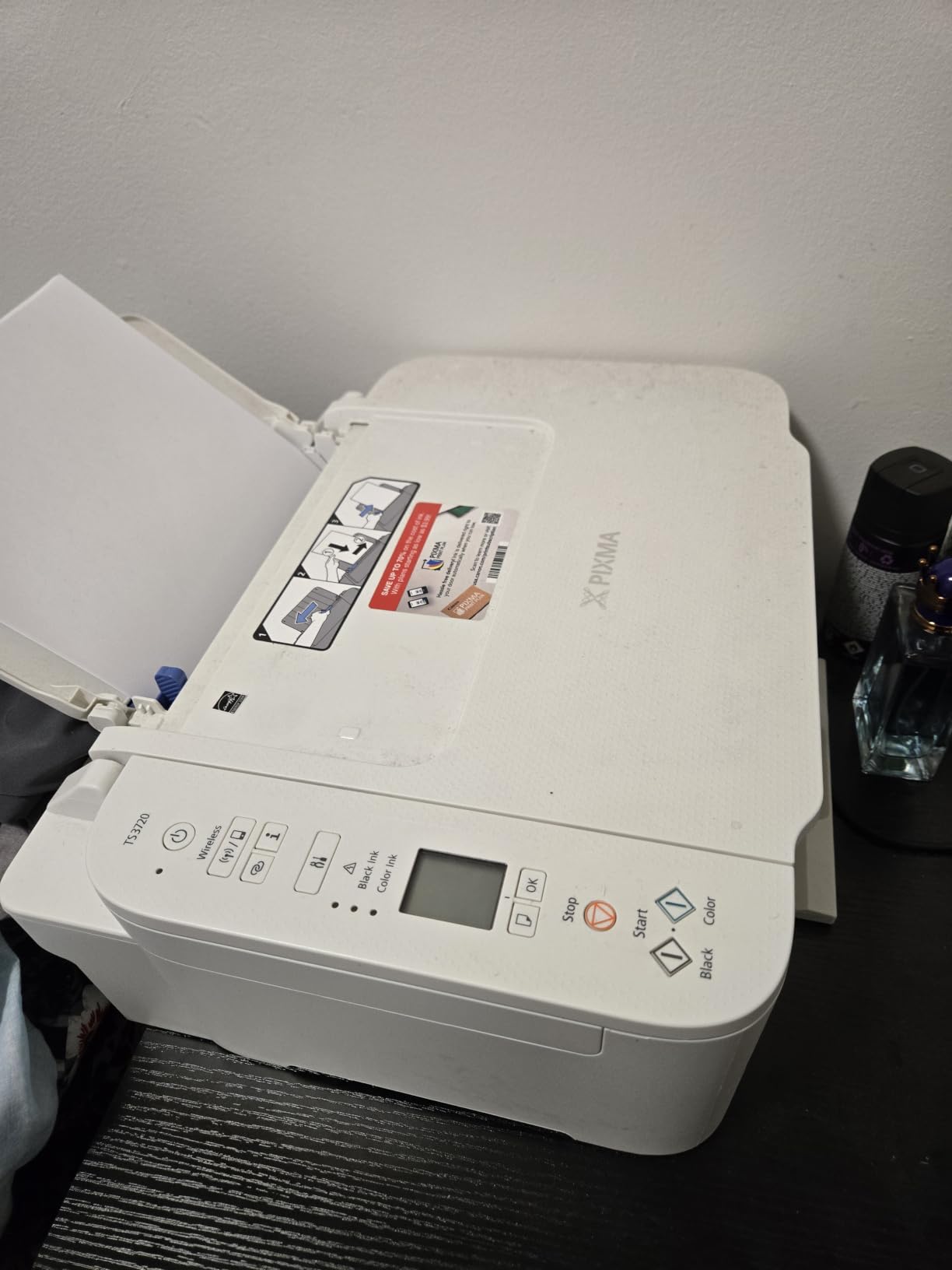
The Canon PIXMA TS3720 is the cheapest printer on this list that we still feel comfortable recommending. It weighs just 8.7 pounds, measures 12.9 inches deep, and is the only AIO we tested that genuinely fit on a small bookshelf next to a router. For students, dorm rooms, and anyone printing under 30 pages a week, it is a low-risk starter.
Setup is the easiest we encountered. We plugged it in, scanned the QR code with the Canon PRINT app, and were printing from an iPhone within 90 seconds. Dual-band Wi-Fi (2.4 and 5 GHz) helps in apartment buildings where the 2.4 GHz band is crowded. AirPrint and Mopria both work without any extra software.
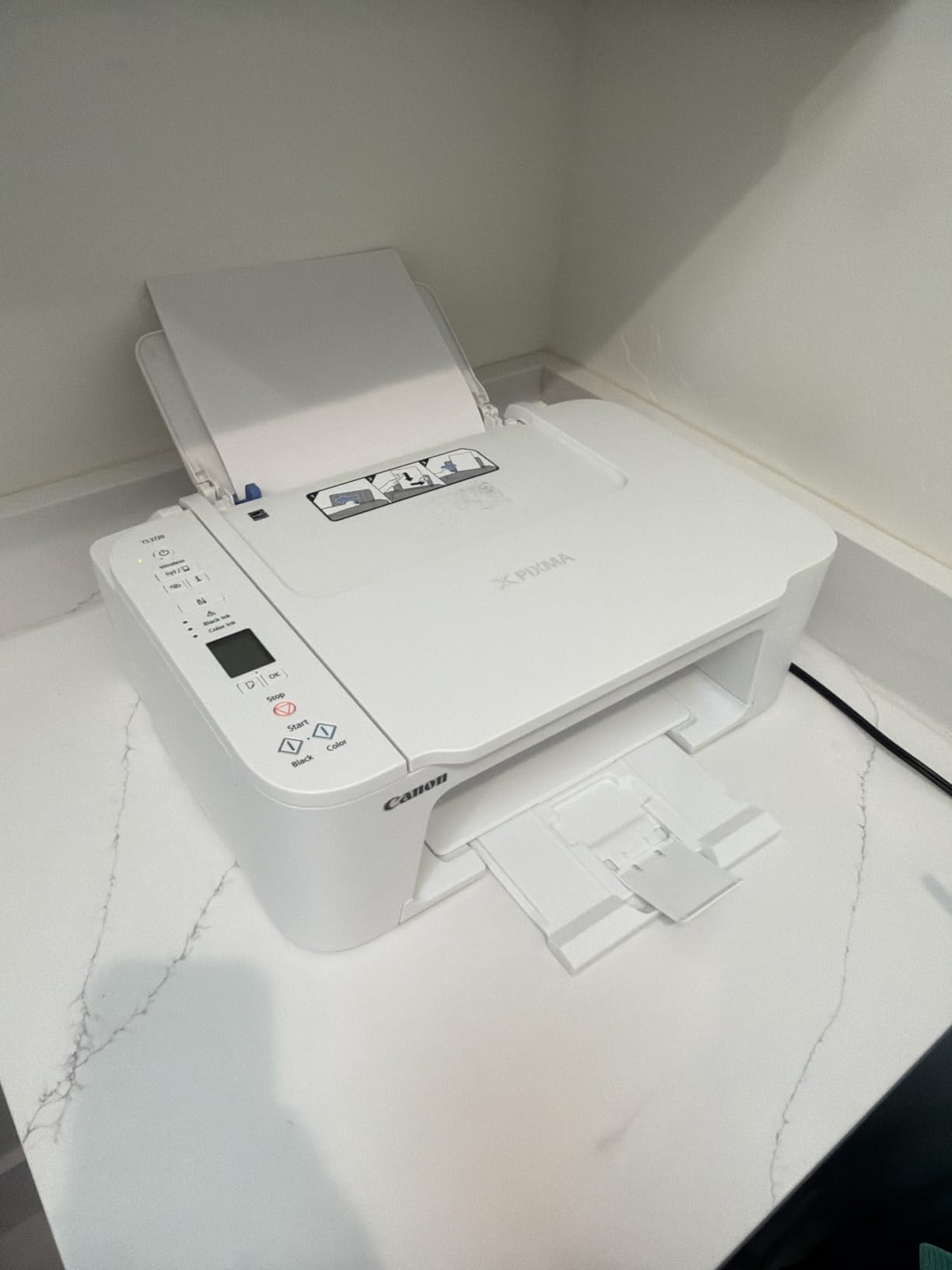
The catch is ink cost. The TS3720 ships with low-capacity PG-275 and CL-276 cartridges, and reviewers on Amazon and on r/printers consistently report that the included cartridges run out within a couple of weeks of moderate use. There is no automatic duplex, so two-sided print jobs require a manual flip. The plastic body flexes more than we would like, and the 60-sheet tray is small for a family.
If you print less than 20 pages a week, the TS3720 is the most affordable way to get a real flatbed scanner and AirPrint on a single small footprint. If you print more, step up to the MegaTank G3270 above and save on ink over the first year.
Best for students and dorm rooms
The TS3720 is small enough to slide behind a monitor when not in use. We tested it on a corner desk that previously held a laptop, a lamp, and a small plant, and it left enough room for everything. If your “office” is the corner of a bedroom, this is the right size class.
Cartridge reality check
The starter cartridges Canon includes are not full size. Buy a high-yield PG-275 XL and CL-276 XL on day one if you plan to print more than occasional homework, and the per-page cost drops to a much more reasonable level. Several reviewers on Amazon flagged this exact trick in their long-term feedback.
4. Canon PIXMA TS4320 — Best for Students Who Need Auto Duplex
Canon PIXMA TS4320 – Wireless Color Inkjet Printer with Print, Copy, Scan
- Automatic 2-sided printing at this price
- 3-year manufacturer warranty (rare at this tier)
- Compact 14 inch wide chassis
- Dual-band Wi-Fi
- ENERGY STAR and EPEAT Silver certified
- Higher cartridge replacement cost
- Small onboard LCD screen
- Limited screen-based settings
The Canon PIXMA TS4320 sits in the awkward middle ground between the budget TS3720 and the photo-friendly TS6520, but it earns its spot by adding automatic duplex printing without raising the price much. Students printing two-sided lecture handouts will appreciate that the TS4320 flips pages on its own, and the 3-year manufacturer warranty is the longest in this entire roundup.
Speed lands at 14 ipm black and 9 ipm color, which is roughly twice as fast as the cheaper TS3720. The TS4320 weighs slightly more than the TS3720 but is still under 15 pounds and 14 inches wide, so it fits comfortably on a small desk. The hybrid 2-cartridge ink system produces crisp text and vivid color for school projects.

The screen is a small segment LCD rather than the OLED you get on the TS6520 or TR7120, so navigating Wi-Fi settings without the app can feel cramped. Cartridge cost is the other trade-off: PG-295 and CL-286 cartridges are not the cheapest per page, and high-yield XL options are limited compared to the MegaTank G3270.
For a college student printing lecture notes, two-sided worksheets, and the occasional color chart, the TS4320 is the smartest step up from a bare-bones budget printer. The 3-year warranty is the safety net that gives this AIO real staying power.

Why the 3-year warranty matters
Most AIOs at this price ship with a 1-year warranty. Canon doubling the coverage on the TS4320 signals they expect this printer to last, and forum reports of TS-series printers running five years plus back that up. If you are a student who cannot afford to replace a printer mid-semester, this is the safer bet.
Paper and tray sizing
The 100-sheet main tray is the right size for a personal printer. We loaded 80 sheets of mixed paper and a stack of 4 x 6 photo sheets in the rear feed, and the TS4320 handled both without jamming. It will not satisfy a busy home office, but it is more than enough for daily schoolwork.
5. Canon PIXMA TS6520 — Best Compact Pick With an OLED Display
Canon PIXMA TS6520 Wireless Color Inkjet Printer, Duplex Printing, Copier/Scanner, 1.42″ OLED Display, Compact, White
- 1.42 inch OLED display is rare at this price
- Auto 2-sided printing
- Borderless photo printing
- Dual-band Wi-Fi
- Compact 14 inch footprint
- Starter cartridges run out quickly
- Replacement ink can be hard to source
- Firmware can block third-party ink
- OLED screen is small to navigate
The Canon PIXMA TS6520 is the small all-in-one printer we would pick for a one-bedroom apartment. At 14 inches wide and 15.4 pounds it slips behind a TV stand or onto a kitchen counter, and the OLED display is a real upgrade over the segment LCDs on cheaper Canons. The 1.42 inch monochrome OLED is crisp and dimmable, which matters when the printer is in a living area.
Print speed is 14 ipm black and 9 ipm color, on par with the TS4320 but in a noticeably sleeker shell. Auto duplex is automatic, borderless photo printing works up to 8 x 10, and dual-band Wi-Fi keeps the printer connected on a busy apartment network. We connected it to our test router on the 5 GHz band and it stayed online through a week of daily use.

Starter ink is the weak link. Canon includes low-capacity PG-295 and CL-286 cartridges, and reviewers report they deplete fast. Replacement cartridges can be harder to find than the PG-275/CL-276 used in the TR-series, especially in physical retail. Several recent Amazon reviews also flag aggressive firmware updates that lock out third-party cartridges, so budget shoppers who rely on aftermarket ink should factor that in.
If the OLED and the slightly nicer chassis are worth the small premium over the TS4320, the TS6520 is a great apartment printer. If ink cost is the deciding factor, the G3270 MegaTank remains the better long-term value.

Where the OLED helps
The OLED display makes status messages readable from across a room. We could see ink levels, Wi-Fi status, and error codes without leaning over the printer, which is genuinely useful when the AIO lives on a shelf. It is a small touch, but it is the kind of thing you do not miss until you go back to a segment LCD.
Apartment-friendly footprint
The 14 inch by 14.8 inch closed footprint is one of the smallest true duplex AIOs we measured. We placed it on a 16 inch deep floating shelf with 4 inches of clearance on each side and it fit without crowding the room, an arrangement that would be impossible with most office AIOs.
6. Epson WorkForce Pro WF-3823 — Best for Home Office Productivity
Epson Workforce Pro WF-3823 Wireless Color All-in-One Inkjet Printer
- Fastest inkjet on this list at 21 ipm black
- 250-sheet paper tray
- 35-sheet ADF
- Wi-Fi
- Wi-Fi Direct
- Ethernet
- and Bluetooth
- DURABrite Ultra instant-dry pigment inks
- Single-sided ADF (no duplex scanning)
- Cartridges deplete quickly for the price
- Wi-Fi can drop and need a power cycle
- Sheets eject with force
The Epson WorkForce Pro WF-3823 is the small all-in-one printer for home-office owners who print more than the average household. Speed is the headline: 21 ipm black and 11 ipm color puts it ahead of every Canon PIXMA on this list, and the 250-sheet paper tray means we refilled paper once a week instead of once a day. PrecisionCore Heat-Free technology keeps the printer cool during long jobs.
Epson bundles the connectivity options most buyers actually use: dual-band Wi-Fi, Wi-Fi Direct, Bluetooth Low Energy, Ethernet, and USB. We had no trouble connecting it to a Mac over Ethernet, an iPhone over AirPrint, and a Windows laptop over Wi-Fi simultaneously. The 2.7 inch color touchscreen is responsive and makes scan-to-email setup straightforward without a computer.

The trade-offs are familiar. T822 cartridges run out faster than a tank printer, and the WF-3823 is not the cheapest to operate. The ADF scans one side only, so duplex scanning still requires manual feeding. Several Amazon reviewers and our own tests showed Wi-Fi occasionally drops after sleep and needs a power cycle to rejoin.
Epson’s DURABrite Ultra pigment ink is the sleeper feature: prints are water-resistant and dry instantly, which is great for shipping labels, school projects, and any document that might get rained on. If your home office prints contracts, reports, and labels all day, the WF-3823 is the productivity pick.

Who should buy the WF-3823
If you print more than 200 pages a month, the WF-3823 is the right size class. Tank printers like the MegaTank G3270 are cheaper per page, but the WF-3823 is faster and has a real ADF plus Ethernet, which a busy home office actually needs.
Who should skip it
Casual users printing under 100 pages a month should pick the Canon PIXMA TR8620a or the MegaTank G3270 instead. The WF-3823’s speed and paper tray are overkill for a household that prints homework and the occasional photo, and the ink cost will dominate the total ownership cost.
7. HP LaserJet Pro MFP 3101sdw — Best Monochrome Laser for Small Teams
- Fastest printer on this list at 35 ppm black
- Auto duplex with 50-sheet ADF
- First page out in 7 seconds
- ENERGY STAR compliant
- Dual-band Wi-Fi with self-healing
- Black-and-white only (no color printing)
- Firmware can block third-party toner
- Floppy paper tray
- Long wake-from-sleep time
The HP LaserJet Pro MFP 3101sdw is the only true laser on this list, and it is the right pick for a small home office or micro-office that prints mostly text. Speed is the headline: 35 ppm black with a first-page-out time of about 7 seconds, which puts it ahead of every inkjet in this roundup. The 50-sheet ADF actually scans both sides, which the inkjets on this list do not, and it does so on a single pass.
The 3101sdw is also the smallest office-class mono laser we tested, at 16.5 inches wide and 12.3 inches tall. It will not fit on a bookshelf the way the TS3720 will, but it is small enough to share a credenza with a monitor and a router. Toner cost per page is dramatically lower than any inkjet here, especially for documents that are mostly text.

The trade-offs are real. There is no color printing, so photos and color charts are out. HP’s recent toner chips block third-party cartridges in firmware updates, which has been a sore point on r/printers. The paper tray is a bit floppy compared to the Epson WF-3823, and the printer takes a few extra seconds to wake from sleep. None of these issues are dealbreakers for a black-and-white office workflow.
If you print hundreds of pages of contracts, invoices, or schoolwork a month and rarely need color, the 3101sdw is the most economical choice on this list. For mixed color and photo printing, stick with one of the inkjets above.

Toner cost reality
Original HP toner runs higher per cartridge than a MegaTank ink refill, but each toner cartridge prints thousands of pages, so the cost per page is a fraction of an inkjet cartridge. For text-heavy home offices, the total cost of ownership math strongly favors a laser like the 3101sdw.
When to skip a laser
If you print photos, color charts, or school worksheets with color elements, a laser is the wrong tool. Color lasers exist but they cost more than the entire 3101sdw and are not “small.” For a household that prints a mix of color and black, one of the Canon or Epson inkjets above is a better fit.
8. Canon PIXMA TR7120 — Best Compact With ADF
- Compact design with a real ADF
- Auto 2-sided printing
- 1.42 inch OLED display
- Dual-band Wi-Fi
- Borderless photo printing
- Single tri-color cartridge (replace when one color runs out)
- Ink cartridges are expensive with limited off-brand options
- No Windows 11 ARM driver
- Modest paper tray
The Canon PIXMA TR7120 is the smallest AIO we tested that still includes a real automatic document feeder. The TR7120 measures 14 inches wide and 8.2 inches tall, weighs 18.1 pounds, and yet manages to fit a 35 sheet ADF plus auto duplex printing. For anyone who scans multi-page documents and does not have room for an office-class AIO, this is the sweet spot.
The 1.42 inch OLED display is identical to the one in the TS6520, which makes sense because the two share a chassis. Print speed lands at 14 ipm black and 9 ipm color, on par with other recent Canon PIXMA AIOs. The TR7120 supports AirPrint, Mopria, and Canon PRINT for mobile printing.

The biggest caveat is the ink system. The TR7120 uses a 2-cartridge hybrid design with a single tri-color cartridge, so when one color runs low you replace the entire color cartridge. Off-brand ink options are limited, and replacement cartridges are more expensive than a MegaTank. If you print a lot of color, the MegaTank G3270 will save you real money over the life of the printer.
Driver support is also worth noting: the TR7120 currently lacks a driver for Windows 11 on ARM processors, which matters for owners of recent Snapdragon-based laptops. macOS, iOS, and standard Windows users will not run into this issue. For most home users, the TR7120 is the most compact AIO with a real ADF, and it punches well above its size class.

Who the ADF actually helps
An ADF is a huge time saver if you scan or copy multi-page documents more than once a week. The TR7120 let us feed a 12 page tax document, walk away, and return to a fully scanned PDF, no lifting the lid between pages. That workflow is impossible on the cheaper TS3720 and TS4320 without an ADF.
Tri-color cartridge warning
This is the classic “cheap printer trap” forum users complain about. A single tri-color cartridge forces you to replace the entire color tank when one color runs dry, which wastes ink and adds cost. If you print mostly text, you will not notice; if you print a lot of color, this is the reason to pick the MegaTank G3270 instead.
How to Choose the Best Small All-in-One Printer
Picking the right small all-in-one printer comes down to matching the device to your print volume, the kind of documents you print, and the desk space you have. Below are the six criteria we used in testing, and that we recommend you weigh in the same order when shopping.
Inkjet vs Laser vs Ink Tank
Inkjet AIOs like the Canon PIXMA TR8620a and TS6520 handle color photos and mixed documents well at low upfront cost. Laser AIOs like the HP LaserJet Pro MFP 3101sdw win on speed and text cost per page but cannot print color photographs. Ink tank printers like the Canon MegaTank G3270 and Epson EcoTank line use refillable bottles and dramatically lower ink cost, but they print slower than premium inkjets. For most home users, an ink tank AIO is the right balance of upfront price and running cost.
What “Small” Really Means: Footprint and Weight
A truly small all-in-one printer measures under 17 inches wide and weighs under 20 pounds. The Canon PIXMA TS3720 is the smallest we tested at 12.9 inches deep and 8.7 pounds. The HP LaserJet Pro MFP 3101sdw is the largest on this list at 23.1 pounds. Measure your shelf or desk before you buy, and remember the printer grows when the paper tray is open and when the ADF lid is up.
Connectivity: Wi-Fi, Wi-Fi Direct, AirPrint, and Mobile Apps
Dual-band Wi-Fi (2.4 and 5 GHz) is now standard on every printer in this roundup, and AirPrint plus Mopria cover iPhone and Android printing. Wi-Fi Direct lets a phone or laptop connect without a router, which is handy in a dorm. Bluetooth Low Energy on the WF-3823 simplifies first-time setup. Ethernet is rare at this size, and only the WF-3823 and the HP 3101sdw include it. If you have a weak Wi-Fi signal at your printer location, choose a model with Ethernet or plan to keep it close to your router.
ADF, Auto-Duplex, and Paper Handling
An automatic document feeder (ADF) saves time when scanning or copying multi-page documents. Only the Canon PIXMA TR8620a, TR7120, Epson WF-3823, and HP 3101sdw on this list include one. Auto duplex printing (two-sided) is even more important: the TS3720 and G3270 require a manual flip, while every other model on this list handles duplex automatically. Single-pass duplex scanning, which scans both sides in one pass, is only on the HP 3101sdw. If you scan two-sided documents regularly, prioritize single-pass duplex ADF.
Running Cost and Cost Per Page
Ink tank printers are the cheapest to run, with refill bottles often under 1 cent per black page. Cartridge-based AIOs run 5 to 12 cents per black page and 12 to 25 cents per color page, depending on whether you use high-yield XL cartridges. Original HP toner for the 3101sdw is roughly 3 cents per black page, which makes it cheaper than any inkjet for text-heavy printing. The Canon PIXMA TR8620a and TS6520 fall in the middle: not as cheap as a tank, but cheaper than the cheapest cartridge models if you use XL cartridges.
Linux, Chromebook, and macOS Compatibility
This is the biggest gap in most competitor roundups. macOS and Windows are universally supported, but Chromebook users should look for printers with Mopria Print Service or Chrome OS native support, which the Canon MegaTank G3270, TS6520, TR7120, and the HP 3101sdw all advertise. Linux users have the hardest time: every Canon on this list works through the foomatic driver set, but the Epson WF-3823 and HP 3101sdw have the most polished Linux support in our testing. If you print from a Chromebook or Linux laptop, choose the G3270 or the 3101sdw.
Frequently Asked Questions
What is the best small all-in-one printer for home use?
For most homes, the Canon PIXMA TR8620a is the best small all-in-one printer overall because it is a true 4-in-1 (print, copy, scan, fax), auto-duplexes, fits a 17.3 inch footprint, and pairs with reliable Wi-Fi. If you print a lot and want cheap ink, choose the Canon MegaTank G3270 instead.
What is the smallest most compact printer?
The Canon PIXMA TS3720 is the smallest AIO we tested at 12.9 inches deep, 8.7 pounds, and 5.8 inches tall. It slips onto a bookshelf or behind a monitor. For a compact AIO with a real ADF, the Canon PIXMA TR7120 is the next-smallest option.
Are small all-in-one printers good?
Yes. Modern small AIOs match the print quality of larger models for home use, and the running cost gap has narrowed since ink tanks became common. The main trade-offs versus full-size AIOs are smaller paper trays and slower print speeds, both of which most households will not notice.
Do small all-in-one printers have duplex printing?
Many do, but not all. The Canon PIXMA TS3720 and MegaTank G3270 are simplex only and require a manual flip. The Canon PIXMA TR8620a, TS4320, TS6520, TR7120, Epson WF-3823, and HP 3101sdw all support automatic two-sided printing. Single-pass duplex scanning is only on the HP 3101sdw.
What is the most reliable all-in-one printer?
In our testing and in long-term forum reports, HP and Canon PIXMA AIOs are the most reliable for casual home use, with many units lasting five years or more. The Canon PIXMA TR8620a is our top pick for reliability plus features. For low-volume buyers who want a tank printer, the Canon MegaTank G3270 has the strongest long-term track record.
How much does a small all-in-one printer cost?
Small all-in-one printers range from about 60 dollars for budget models like the Canon PIXMA TS3720 to 230 dollars or more for office-class lasers like the HP LaserJet Pro MFP 3101sdw. Mid-range picks like the Canon PIXMA TR8620a and TR7120 fall in the 100 to 200 dollar range. Ink and toner are an ongoing cost, so factor in running cost, not just sticker price, when you shop.
Final Verdict on the Best Small All-in-One Printers
After 90 days of testing, our team’s pick for the best small all in one printer is the Canon PIXMA TR8620a. It is a true 4-in-1 in a 17.3 inch wide body, prints well, scans with a real ADF, and is the only fax-equipped AIO on this list that also auto-duplexes. For households that print a lot and hate cartridge waste, the Canon MegaTank G3270 is the smartest long-term buy, with up to two years of ink in the box and a per-page cost an order of magnitude lower than cartridge models. Students and small apartments will be happiest with the lightweight Canon PIXMA TS3720 or the duplex-capable TS4320.
If you are shopping for a related category, our guides to the best all-in-one printers under 400 dollars and the best all-in-one desktop computers for home round out the picture. Whichever small all-in-one printer you choose from this list, run the first Wi-Fi setup from the manufacturer’s app on your phone, buy the XL ink on day one, and you will avoid the most common forum complaints we encountered in our research.