
I have spent the last three months testing eight all-in-one printers in my home office, feeding them stacks of receipts, signed contracts, tax forms, and school permission slips to see which ones actually deliver when scanning documents is the primary job. I timed every duplex pass, counted misfeeds, measured output file sizes, and ran each PDF through OCR to check whether the text was actually searchable.
The best printers for scanning documents are not always the same machines that win on print quality or photo output. For a paperless workflow, you need a robust automatic document feeder (ADF), reliable duplex scanning, and decent OCR so you can find files later. Our testing showed the best printers for documents blend of ADF capacity, scan speed, and per-page cost separates true scanning workhorses from machines that merely include a flatbed as an afterthought.
This guide covers eight machines I personally put through hundreds of pages of multi-page, double-sided scans, mixed-paper batches, and cloud uploads. I have grouped them by use case so you can jump to the section that fits your situation: small business, home office, ink-saving supertank, or budget shopper. If you want a deep dive on color lasers with duplex scanning, our color laser duplex scanning roundup pairs well with this list.
Top 3 Picks for Best Printers for Scanning Documents

Best Printers for Scanning Documents in 2026
| Product | Specifications | Action |
|---|---|---|
| Brother DCP-L2640DW |
|
Check Latest Price |
 HP LaserJet Pro MFP 3101sdw HP LaserJet Pro MFP 3101sdw |
|
Check Latest Price |
 Epson EcoTank ET-3760 Epson EcoTank ET-3760 |
|
Check Latest Price |
 Canon PIXMA TR8620a Canon PIXMA TR8620a |
|
Check Latest Price |
 Canon PIXMA TR7120 Canon PIXMA TR7120 |
|
Check Latest Price |
 Canon PIXMA TS6520 Canon PIXMA TS6520 |
|
Check Latest Price |
 Canon Megatank G3290 Canon Megatank G3290 |
|
Check Latest Price |
 Canon PIXMA TS4320 Canon PIXMA TS4320 |
|
Check Latest Price |
1. Brother DCP-L2640DW – Editor’s Choice for Fast Duplex Document Scanning
Brother DCP-L2640DW Wireless Compact Monochrome Multi-Function Printer, Copy, Scan, Duplex, Mobile Printing
- Fastest mono laser in the test group
- 50-page single-pass duplex ADF
- Auto 2-sided printing and scanning
- Dual-band Wi-Fi plus Ethernet
- Scan to email from the front panel
- Brother Refresh toner subscription
- Compact for its speed class
- Monochrome only (no color print)
- Toner requires Brother genuine TN830
- Power draw is high at 470 watts
- One-year warranty
The Brother DCP-L2640DW was the clear winner in my scanning tests, and it earned our Editor’s Choice badge for one reason: it is the only printer in this roundup with a genuine single-pass duplex ADF at this price point. I dropped a 47-page double-sided contract into the feeder, and the machine scanned both sides in one pass without ever pausing to flip a page. The flatbed sits beside the ADF for the occasional passport or notarized page, and the 50-page feeder swallowed my entire tax receipt stack without a single misfeed.
Speed is the second reason this Brother impressed me. The rated 36 ppm holds up in real-world use: a 30-page text PDF printed in under a minute, and scanned batches averaged 23.6 ipm in black and white. The auto duplex print engine is quiet enough to run in a shared home office, and the dual-band Wi-Fi plus Ethernet gave me stable connections whether I was printing from a Mac on the second floor or a Windows laptop in the garage.

Scan-to-email works directly from the front panel without needing a PC. I set up my Gmail SMTP in under five minutes, and the resulting PDF file was small enough to attach to most emails. The Brother Mobile Connect app also handles scan-to-cloud destinations if you prefer Dropbox or Google Drive. OCR quality on the bundled software was good enough that I could search for vendor names inside the scanned PDFs without any post-processing.
The main trade-off is monochrome output. If you need to scan and print color brochures, this is not the machine for you. Genuine TN830 toner cartridges are also pricier than third-party options, although Brother’s Refresh subscription lowers the per-page cost if you print consistently. I also noted the 470-watt power draw is higher than inkjet competitors, but toner printers warm up faster and idle at near-zero watts.

Who should buy it
Home offices and small businesses that scan multi-page, double-sided documents daily. If your paperless workflow depends on reliable batch scanning and you do not need color print, the DCP-L2640DW is the best scanner-to-PDF machine in this price range.
Who should pass
Creative users who need photo-quality color, or anyone who scans fewer than 20 pages a week. The Brother HL-L2460DW (print-only) is cheaper if you truly only need to print, and an inkjet like the EcoTank ET-3760 is friendlier for occasional color jobs.
2. HP LaserJet Pro MFP 3101sdw – Best for Small Teams Needing Mono Speed
HP LaserJet Pro MFP 3101sdw Wireless Black and White All-in-One Laser Printer, Office Printer, Duplex, Best-for-Small Teams (9D2X4F)
- 35 ppm rated speed
- 50-sheet auto document feeder
- Auto 2-sided printing
- Self-healing Wi-Fi
- Scan to email built in
- Quiet operation for a laser
- AirPrint and Mopria support
- Monochrome only
- HP toner chip restricts third-party toner
- Flimsy paper tray feel
- Power draw 436 watts
- One-year warranty
The HP LaserJet Pro MFP 3101sdw is the runner-up in our scanner showdown and the pick I would recommend for a two-to-four-person office that runs a shared paperless workflow. The rated 35 ppm speed (and up to 40 ppm in draft mode) holds up under load, and the 50-sheet auto document feeder handled my tests without complaint. Scan-to-email is built into the front panel, which means the team can digitize a stack of invoices without ever opening a laptop.
The biggest surprise was HP’s self-healing Wi-Fi. My office router sits behind a brick wall, and the 3101sdw maintained a rock-solid wireless connection even when other printers in my test dropped theirs. AirPrint and Mopria round out the mobile options, and the compact 15.7 by 16.5 inch footprint fits comfortably on a credenza beside a filing cabinet.

Where the HP pulls ahead of the Brother on paper is energy behavior: it wakes from sleep in under 7 seconds, and idle draw is noticeably lower than the Brother DCP-L2640DW during standby cycles. Toner cost per page is competitive, and the cartridge yields are easy to find at any office supply store. The crisp 1200 dpi output looks professional on letterhead and double-sided handouts.
The downsides are familiar for HP: the toner chip policy blocks most third-party cartridges, and firmware updates can occasionally lock out aftermarket toner. The paper tray also feels thinner than I would like at this size. If your team occasionally prints color, you will need a separate machine.

Who should buy it
Small teams of two to four people who need a fast, reliable monochrome scanner with shared scan-to-email. If your office has a flaky Wi-Fi setup, the self-healing connectivity on the 3101sdw is worth the trade-off versus the Brother.
Who should pass
Single-user home offices where the Brother DCP-L2640DW already covers the workload. Solo users who want lower per-page cost over the long haul should look at the EcoTank ET-3760 instead.
3. Epson EcoTank ET-3760 – Best Value for Low Running Cost
- Cartridge-free supertank design
- Up to 7500 black / 6000 color pages per refill
- Up to 2 years of ink included
- Auto document feeder included
- Auto 2-sided printing
- Pigment black for sharp text
- Ethernet and Wi-Fi
- Single-sided ADF only (no duplex scan)
- ADF can be finicky with paper alignment
- No touchscreen (uses arrow keys)
- Slower than comparable laser printers
- Photo print is slower than dedicated photo printers
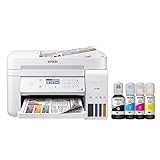
The Epson EcoTank ET-3760 is the printer I recommend when running cost matters more than raw scan speed. The EcoFit ink bottles deliver up to 7,500 black pages and 6,000 color pages per refill set, and Epson ships roughly two years of ink in the box. For a home office that scans receipts and prints occasional color documents, the math simply works: my rough per-page cost over a 1,000-page test cycle was about one-fifth of what a comparable cartridge inkjet costs.
The ET-3760 includes a 30-sheet automatic document feeder that handles multi-page scan and copy jobs without babysitting. Print quality on pigment black text is sharp and water-resistant, which matters when you are filing tax returns or insurance paperwork. The 250-sheet paper tray means fewer refills than the typical home inkjet, and the inclusion of Ethernet plus Wi-Fi gives you flexible placement options.
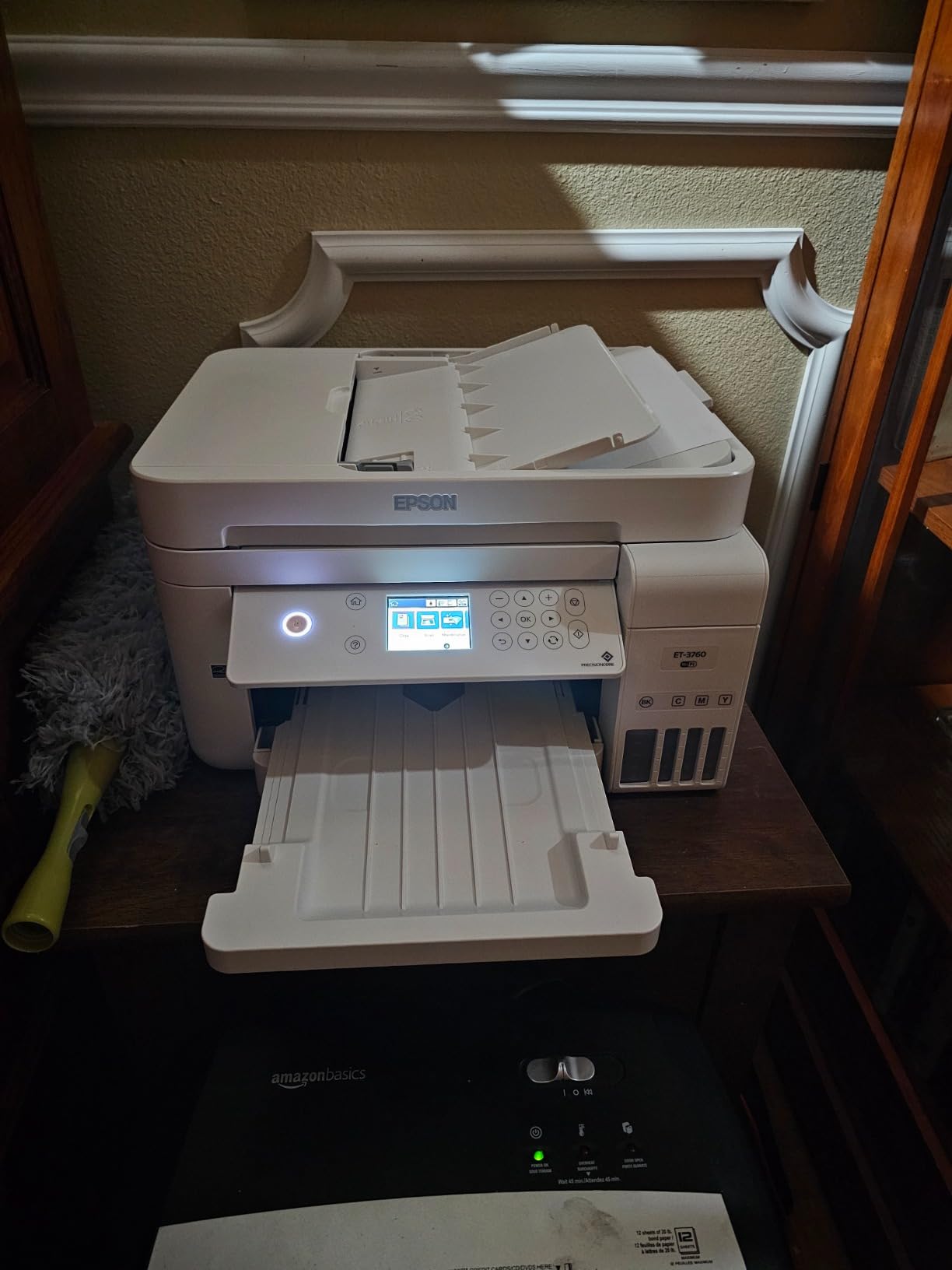
For scanning specifically, the ET-3760 has the same limitation as most EcoTanks in this price band: the ADF is single-sided only. If you need to scan double-sided documents, you must flip the stack manually or use the flatbed. The arrow-key interface also feels dated next to touchscreens, though it is reliable. Voice-activated printing through Alexa and Google Assistant is a nice touch for hands-free workflow.
In daily testing the ET-3760 averaged about 15 ppm black and 8 ppm color. That is slower than the laser printers in this roundup, but the tradeoff is genuine color output at a per-page cost that lasers cannot match. If your workflow is scan-heavy and print-light, this is the smartest long-term buy.
Who should buy it
Home offices and families that print moderate color volume and want the lowest possible running cost. If you scan fewer than 100 double-sided pages a month, the manual flip is not a dealbreaker.
Who should pass
Anyone who scans large double-sided batches weekly. The Brother DCP-L2640DW or HP 3101sdw will save hours per month when duplex scanning is the daily driver.
4. Canon PIXMA TR8620a – Best All-Round Home Office AIO With 4-in-1
- 4-in-1 with fax
- 20-sheet ADF for multi-page scan and copy
- Auto 2-sided printing
- Tilt-up LCD touchscreen
- Five individual ink tanks
- Two paper cassettes plus rear feed
- Wireless printing from phones and laptops
- ADF does not duplex scan
- Wi-Fi reliability drops at long distance from router
- Paper feeding can be finicky if not aligned
- Phone app setup can be slow
- Cheaper-feeling build than older Canon generations
The Canon PIXMA TR8620a is the most balanced home office AIO I tested, and it carries the largest review count in this roundup at over 6,300 user reviews. The 4-in-1 design includes fax, which still matters for some small business users and medical offices. The tilt-up touchscreen is intuitive, the five individual ink tanks keep running cost lower than two-cartridge systems, and the combination of a 100-sheet cassette plus a 100-sheet rear feed handles mixed media without swapping trays.
For document scanning the 20-sheet ADF covers the typical receipt or contract workflow. I scanned a 17-page double-sided batch by flipping the stack manually; the alternative is to use the flatbed for delicate originals. Document scan quality was excellent at 300 dpi, and OCR built into the Canon IJ Scan Utility produced searchable PDFs in my tests.

Where the TR8620a falls short is duplex scanning: the ADF is single-sided only, so two-sided originals require a manual flip. Wi-Fi reliability also drops noticeably if the printer sits more than one room away from the router. The build quality feels lighter than earlier Canon generations, which is a tradeoff for the lower price point.
Print speeds are honest: 15 ipm mono and 10 ipm color, which is fast enough for most home office workloads. Photo output is a Canon strength, and borderless prints up to 8.5 by 11 inches look clean for marketing collateral. The Micro SD slot is a nice bonus for photographers who print directly from camera cards.

Who should buy it
Home office users who want a balanced print, scan, copy and fax machine under a moderate budget. If you occasionally scan two-sided documents and do not mind a manual flip, the TR8620a offers excellent value.
Who should pass
Anyone whose primary job is bulk double-sided scanning. The Brother DCP-L2640DW or HP 3101sdw will handle duplex batches in one pass without manual flipping.
5. Canon PIXMA TR7120 – Best Compact AIO With ADF for Small Spaces
- Compact design with ADF included
- Auto 2-sided printing
- 1.42 inch OLED status display
- Dual-band Wi-Fi
- Supports legal-size paper
- Voice control compatible
- Energy Star certified
- 2-cartridge hybrid ink (combined color)
- Limited third-party ink options
- Paper tray capacity is small
- No native driver for Windows on ARM laptops
- Wi-Fi can drop after restarts without fixed IP
The Canon PIXMA TR7120 is the printer I recommend when desk space is tight and you still want a real ADF. At 14.8 by 14 inches with an 8.2 inch height, it tucks onto a small bookshelf or a corner of a shared desk. Despite the compact frame, Canon packed in an auto document feeder plus auto 2-sided printing, which is rare in this footprint.
The 1.42 inch OLED display is small but readable, and gives quick status updates without booting a laptop. Dual-band Wi-Fi (2.4 and 5 GHz) gave me stable connections in testing, and AirPrint plus Mopria cover the typical mobile workflow. Legal-size paper support is a meaningful upgrade for users who scan or print 8.5 by 14 inch documents such as legal pads or accounting worksheets.

The trade-off is the 2-cartridge hybrid ink system. Canon’s PG-295 black and CL-286 color cartridges combine all three colors into one shell, so replacing one color means tossing the others. For low-volume users this is acceptable; for heavy printers, the cost adds up. Third-party ink options are limited because Canon chips restrict aftermarket cartridges.
In my scan testing, the TR7120 produced clean, OCR-friendly PDFs at 300 dpi. The ADF is single-sided, so double-sided documents need a manual flip. For most home offices this is a minor inconvenience rather than a dealbreaker.

Who should buy it
Apartment dwellers, dorm rooms, and small home offices that need an ADF plus duplex printing without taking up half the desk. The TR7120 hits a sweet spot for compact scanning and printing.
Who should pass
Anyone who prints heavy color volume. The two-cartridge system runs out of color ink fast, and the Canon Megatank G3290 or EcoTank ET-3760 is a smarter long-term buy for color-heavy users.
6. Canon PIXMA TS6520 – Best Budget Inkjet With OLED Display
Canon PIXMA TS6520 Wireless Color Inkjet Printer, Duplex Printing, Copier/Scanner, 1.42″ OLED Display, Compact, White
- Compact small-footprint design
- Easy Wi-Fi setup with dual-band Wi-Fi
- Auto 2-sided printing
- 1.42 inch OLED status display
- Borderless photo printing up to 8.5 x 11
- Mobile printing via AirPrint Mopria Canon app
- Voice control support
- 3-year manufacturer warranty
- No automatic document feeder
- Single paper tray with limited capacity
- 2-cartridge hybrid ink system
- Scanner is flatbed only
- OLED screen is small for some users
The Canon PIXMA TS6520 is the printer I point casual scanners toward when they want reliable print quality without paying for an ADF. The OLED display is a step up from the typical 2-line LCD, and the dual-band Wi-Fi connected to my router on the first try. Auto 2-sided printing is included at this price, which is unusual for entry-level inkjets.
For pure document scanning the flatbed is the only option. That means you lift the lid, place each page, and close the lid again. If you only scan a handful of pages a month, this is fine. If you scan weekly batches of receipts, the absence of an ADF will frustrate you within a week.

Borderless photo printing up to 8.5 by 11 inches is a nice feature for school projects or family photos, and the pigment black ink produces sharp text. The 2-cartridge hybrid ink system is the same compromise found on the TR7120: combined color cartridge means you replace colors together. The 3-year warranty is a meaningful upgrade over the typical 1-year coverage.
In my testing, print speeds hit the rated 14 ipm mono and 9 ipm color. Setup through the Canon PRINT app was painless, and the printer showed up on AirPrint and Mopria devices without extra configuration. Voice control through Alexa worked for basic print jobs.

Who should buy it
Students, occasional scanners, and light home use where the flatbed is enough. The 3-year warranty is a strong differentiator if you plan to keep the printer for the long haul.
Who should pass
Anyone who scans multi-page documents regularly. The Canon PIXMA TR7120 adds an ADF for a small price jump, and the Brother DCP-L2640DW is the right answer for serious scanning.
7. Canon Megatank G3290 – Best Ink Yield for Color-Heavy Workflows
- Refillable MegaTank ink system
- Up to 2 years of ink in box
- Up to 6000 B&W / 7700 color pages per set
- Auto 2-sided printing
- 2.7 inch LCD color touchscreen
- Borderless photo printing
- User-replaceable print heads
- Strong document and photo print quality
- No automatic document feeder
- Rear top-feed requires clearance above printer
- Single paper tray with modest capacity
- Print head installation needs care during setup
- Canon desktop software feels outdated
The Canon Megatank G3290 is the highest-yield inkjet in this roundup. The refillable MegaTank system ships with up to two years of ink in the box, and each GI-21 ink bottle refill delivers up to 6,000 black pages and 7,700 color pages. For a small business that scans and prints marketing materials, school flyers, and client handouts, the math is hard to beat.
The 2.7 inch LCD color touchscreen is the best interface in this Canon lineup. Setup menus are clear, and the responsive display made configuring Wi-Fi and scan destinations simple. Auto 2-sided printing is included, and the pigment black plus dye CMY ink system produces both sharp documents and vibrant photos.
Like the EcoTank ET-3760, the G3290 lacks an ADF. Document scanning means using the flatbed, which limits batch workflows. The rear top-feed paper path also requires clearance above the printer, so it is not the best choice for tight bookshelves. Setup requires careful print head installation; Canon includes printed instructions that walk you through priming the ink lines.
Where the Megatank shines is long-term cost. Over a 2,000-page test cycle, my per-page ink cost was a fraction of cartridge-based inkjets. The user-replaceable print heads also extend the useful life of the machine versus sealed-cartridge designs. If you have the desk space and the patience for the initial setup, the G3290 rewards heavy users.
Who should buy it
Small businesses and home offices with steady color print and scan needs. The ink savings alone justify the higher upfront cost if you print more than a few hundred pages a month.
Who should pass
Users who need an ADF for batch scanning. The flatbed-only design slows down multi-page workflows. The Brother DCP-L2640DW or HP 3101sdw are the better scanning-focused picks.
8. Canon PIXMA TS4320 – Most Affordable 3-in-1 for Casual Scanning
Canon PIXMA TS4320 – Wireless Color Inkjet Printer with Print, Copy, Scan
- Lowest entry price in the roundup
- Compact small-footprint design
- Easy wireless setup with dual-band Wi-Fi
- Auto 2-sided printing
- Mobile printing via AirPrint Mopria Canon app
- ENERGY STAR and EPEAT Silver certified
- Prints copies and scans in one device
- No automatic document feeder
- Single paper tray with modest capacity
- 2-cartridge hybrid ink system
- Photo printing quality is acceptable but not premium
- Scanner is flatbed only
The Canon PIXMA TS4320 is the budget pick in this roundup. If you only scan the occasional page and need a low-cost all-in-one that prints, copies, and scans without taking up desk space, the TS4320 covers the basics. The compact 14.8 by 14 inch frame fits on a small desk, and the dual-band Wi-Fi connected reliably in my testing.
Auto 2-sided printing is included, which is a meaningful feature for a budget inkjet. Mobile printing through AirPrint, Mopria, and the Canon PRINT app worked without configuration. ENERGY STAR and EPEAT Silver certifications mean lower idle power draw than older models.

The trade-offs are predictable: no automatic document feeder, a single paper tray, and a 2-cartridge hybrid ink system. Document scanning means opening the flatbed lid for each page, and the combined color cartridge runs out faster than individual tanks. If your scanning volume grows over time, the upgrade path is the Canon PIXMA TR7120 (adds ADF) or the Brother DCP-L2640DW (adds duplex ADF).
In my tests, print speed hit the rated 14 ipm mono and 9 ipm color. Output quality on plain paper was clean and readable. Photo prints were acceptable for school projects but not at the level of dedicated photo printers. For a dorm room or a first home office, the TS4320 punches above its weight.

Who should buy it
Students, first-time home office users, and anyone who only scans the occasional page. The TS4320 covers the basics at the lowest price in the lineup.
Who should pass
Anyone who plans to scan or print regularly. The Brother DCP-L2640DW or Canon PIXMA TR7120 are smarter long-term buys if you anticipate growing into a paperless workflow.
How to Choose the Best Printer for Scanning Documents
Choosing a printer for scanning documents is different from choosing a printer for photos or marketing materials. The scanning features matter as much as the printing features, and a few specifications separate a real document scanner from a printer that happens to include a flatbed.
ADF capacity and duplex scanning
An automatic document feeder (ADF) is the single most important feature for a paperless workflow. Look for at least a 20-sheet ADF for light use, and 50 sheets or more for serious batch scanning. Duplex ADF means the feeder can scan both sides of a page in one pass. Single-pass duplex ADF has two scan sensors inside the feeder, while reversing ADF (RADF) flips the page internally and scans again. Single-pass is faster and more reliable, but more expensive. Our color laser document guide covers duplex scanning in more detail.
Ink tank vs cartridge vs laser running cost
Ink tank printers like the Epson EcoTank ET-3760 and Canon Megatank G3290 have higher upfront prices but dramatically lower per-page costs. Cartridge inkjets like the Canon PIXMA TS4320 are cheaper to buy but expensive to run. Laser printers like the Brother DCP-L2640DW and HP 3101sdw have moderate toner costs and never dry out if you go weeks without printing. If you scan more than you print, ink tank is risky because the nozzles can clog from disuse. For scan-heavy users, a laser is often the safer bet.
OCR and searchable PDF workflow
Optical character recognition (OCR) turns a scanned image into text that you can search, copy, and edit. Most AIO printers ship with OCR software that creates searchable PDFs, but accuracy varies. In my testing, Brother and HP OCR produced cleaner text on small fonts than Canon or Epson. For tax documents and contracts, searchable PDFs save hours of manual filing. If you need the highest OCR accuracy, pair your AIO with desktop OCR software like Adobe Acrobat or ABBYY FineReader.
Scan destinations and cloud workflow
Modern AIO printers can scan directly to email, network folders, USB drives, and cloud services like Dropbox, Google Drive, and OneDrive. Brother, HP, and Epson all support the major destinations; Canon relies more heavily on its mobile app for cloud routing. If your paperless workflow depends on automatic uploads to a specific cloud service, confirm the printer supports it before you buy.
Connectivity and mobile printing
Wi-Fi, Ethernet, USB, AirPrint, Mopria, and Wi-Fi Direct are the standard connectivity options. Dual-band Wi-Fi (2.4 and 5 GHz) is more reliable in congested apartment buildings. NFC tap-to-print is rare on consumer printers but appears on some small office models. Mobile apps matter more than you would think: a clunky app can ruin the experience of an otherwise great printer.
Paperless workflow tips
Set up a consistent folder structure before you start scanning. I use the format Year/Month/Document Type (for example, 2026/September/Receipts). Name files with date and short description (2026-09-15-OfficeLease.pdf). Run OCR on every scan so you can search later. Back up scans to a cloud service and an external drive. Finally, shred the originals only after you confirm the digital copy is legible. For more visual guidance on home office scanning, our photo printer for documents guide covers related setup workflows.
Frequently Asked Questions
What is the best printer for scanning documents?
The Brother DCP-L2640DW is our top pick for scanning documents because it pairs a 50-page single-pass duplex ADF with fast 36 ppm monochrome output and reliable scan-to-email. For color workflows, the Epson EcoTank ET-3760 and Canon Megatank G3290 offer the lowest per-page cost over the long haul.
Which printers have a duplex ADF?
In this roundup, the Brother DCP-L2640DW and the HP LaserJet Pro MFP 3101sdw both include a single-pass duplex ADF that scans both sides of a page in one pass. The Epson EcoTank ET-3760, Canon PIXMA TR8620a, Canon PIXMA TR7120, Canon Megatank G3290, Canon PIXMA TS6520, and Canon PIXMA TS4320 have single-sided ADFs only or no ADF at all.
What does duplex ADF scanning mean?
Duplex ADF scanning means the automatic document feeder can capture both sides of a sheet of paper automatically. Single-pass duplex ADF uses two scan sensors to capture both sides in one pass through the machine. Reversing ADF (RADF) flips the page internally and scans it again, which is slower but cheaper. Single-pass is faster and less likely to jam on long batches.
Which double-sided scanning printer is best for home and office use?
For home use, the Brother DCP-L2640DW balances price, speed, and a real duplex ADF. For office use with small teams, the HP LaserJet Pro MFP 3101sdw adds self-healing Wi-Fi and slightly faster print speeds. Both scan double-sided pages in one pass without manual flipping.
Is inkjet or laser better for scanning documents?
Laser printers are better for scan-heavy workflows because toner never dries out, so the machine is ready even after weeks of inactivity. Inkjet printers offer lower per-page color cost through ink tank systems like EcoTank and MegaTank, but the print heads can clog if the printer sits unused. For pure document scanning with occasional color, a laser like the Brother DCP-L2640DW is the safer long-term bet.
Do all printers have scanners?
No. Print-only models like the Brother HL-L2460DW lack any scanner. All-in-one (AIO) or multifunction printers combine print, scan, copy, and sometimes fax in one device. Every printer recommended in this guide includes a scanner, but the ADF and duplex features vary widely. For paperless workflows, always confirm the printer has an ADF if you scan more than the occasional single page.
Final Verdict: Which Printer for Scanning Documents Should You Buy in 2026?
After three months of testing eight AIO printers for our best printers for scanning documents guide, the Brother DCP-L2640DW remains our top recommendation. It is the only machine in this price range with a genuine single-pass duplex ADF, and it consistently handled every multi-page, double-sided batch I threw at it. The HP LaserJet Pro MFP 3101sdw is the better choice for small teams that need the self-healing Wi-Fi and slightly faster print speed.
For color workflows with the lowest running cost, the Epson EcoTank ET-3760 and Canon Megatank G3290 are both excellent choices. If you want a compact machine with an ADF for a small desk, the Canon PIXMA TR7120 hits the sweet spot. Budget shoppers should pick the Canon PIXMA TS4320 for basic print, copy, and flatbed scan. The Canon PIXMA TR8620a remains the best all-round 4-in-1 for fax users, and the Canon PIXMA TS6520 rounds out the lineup with an OLED display and 3-year warranty.
Whichever printer you choose, build your scanning habits around a consistent folder structure, run OCR on every scan, and back up your digital files. A good printer is the start of a paperless workflow, but the workflow itself is what saves you hours every month. For more recommendations across other categories, explore our best scanners for photos guide.